
User experience decides how people feel when they use your website, app, software, or digital product. A good experience helps users complete tasks without confusion. A bad one makes them leave, complain, or never return. This guide explains the user experience basics every team should understand.
Key Takeaways
Here are the main things you will learn from this guide:
- User experience is about how easy and helpful something feels to use
- UX is different from UI, customer experience, and brand experience
- Good UX improves trust, engagement, conversions, and retention
- The best UX comes from research, testing, and continuous improvement
- Small UX fixes can make a big difference in how users behave
What Is User Experience?
User experience, or UX, is the overall experience a person has while using a product, website, app, service, or system. It includes how easy the product is to understand, how quickly users can complete tasks, and how they feel during the process.
UX is not only about design. A website can look modern and still create a poor experience if users cannot find what they need. In the same way, a simple interface can work beautifully if it helps users complete their goals with less effort.
Think about a website contact form. If the fields are clear, the button is visible, and the confirmation message appears instantly, the experience feels smooth. If the form reloads, shows unclear errors, or asks for unnecessary details, users may leave before submitting.
That is the heart of UX. It removes friction between the user and the outcome they want.
UX Is More Than Website Design
Many people think UX only applies to websites and mobile apps. In reality, UX exists anywhere people interact with something to complete a task. It can be a checkout counter, ATM machine, restaurant menu, remote control, booking system, or software dashboard.
A good ride-sharing app is a simple example. You open the app, set your destination, check the fare, confirm the ride, track the driver, and pay. When every step feels clear, the UX works quietly in the background.
Bad UX becomes obvious when something breaks. If the app hides pricing, shows confusing pickup points, or makes cancellation hard, the user feels frustrated. The feature may still exist, but the experience fails because the journey feels difficult.
Good UX often feels invisible. Users do not stop to admire it. They simply get things done without stress.
UX vs UI vs CX vs BX
UX is often confused with UI, CX, and BX. These areas are connected, but they are not the same. Understanding the difference helps teams make better design, marketing, and product decisions.
Here is how the terms differ:
- UI means the visual interface users interact with
- UX means the full experience of using a product or system
- CX means the complete customer journey with a business
- BX means the emotional impression people have of a brand
For example, a mobile banking app may have beautiful icons and colors. That is UI. If users can transfer money, check balances, and download statements without confusion, that is UX. If support, notifications, and service quality are also helpful, that improves CX.
Brand experience is the bigger emotional picture. If the app, support, emails, and communication all feel reliable, people trust the brand more. UX plays a major role in building that trust.
Why User Experience Matters
Good UX helps users, but it also supports business growth. When people can complete tasks easily, they stay longer, trust faster, and take action with more confidence. That action may be signing up, booking a call, submitting a form, buying a product, or using a feature.
Poor UX does the opposite. It creates hesitation. Users may not complain directly, but they show frustration through bounce rates, abandoned forms, support tickets, low engagement, and lost conversions.
A slow website, confusing menu, unclear pricing page, or broken form can quietly damage results. People usually do not wait for brands to explain. They leave and find another option that feels easier.
That is why UX is not only a design concern. It affects marketing, sales, support, retention, and brand reputation.
Core Elements of Good UX
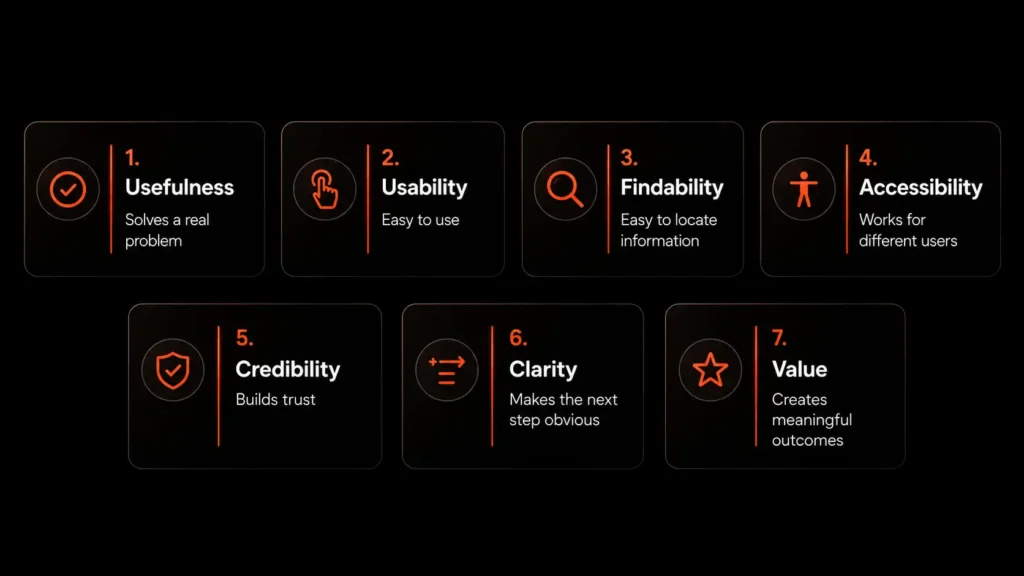
Great UX is built from several connected elements. A product does not need to be fancy to offer a good experience. It needs to be useful, clear, accessible, trustworthy, and easy to use.
The most important UX elements include:
- Usefulness
- Usability
- Findability
- Accessibility
- Credibility
- Clarity
- Value
Usefulness comes first. If the product does not solve a real problem, the experience will not matter much. A useful product helps people save time, complete a task, answer a question, or achieve a goal.
Usability means people can use the product without confusion. Findability means they can locate information, pages, features, or actions quickly. Accessibility makes sure more people can use the experience, including users with different abilities, devices, or browsing conditions.
Credibility builds trust. Clear content helps users understand what to do. Value connects the experience to a real outcome for both the user and the business.
The UX Improvement Process
Good UX does not happen by accident. It comes from understanding users, finding problems, testing ideas, and improving over time. You do not need a complicated framework to start. A simple process is often enough.
A practical UX improvement process includes five steps:
- Understand the user
- Map the journey
- Design the solution
- Test with real users
- Improve continuously
Start by learning who your users are and what they want to do. Use surveys, interviews, analytics, support tickets, heatmaps, and customer feedback. These sources reveal where people struggle and what they expect from the experience.
Next, map the journey. Look at every step users take from the first visit to the final action. This helps you find gaps between what users want and what your product currently gives them.
After that, design a better solution. This may be a new layout, clearer copy, shorter form, better onboarding flow, improved navigation, or stronger mobile experience. Then test the change with real users and keep improving based on what you learn.
User Experience Basics: The Double Diamond Design Process
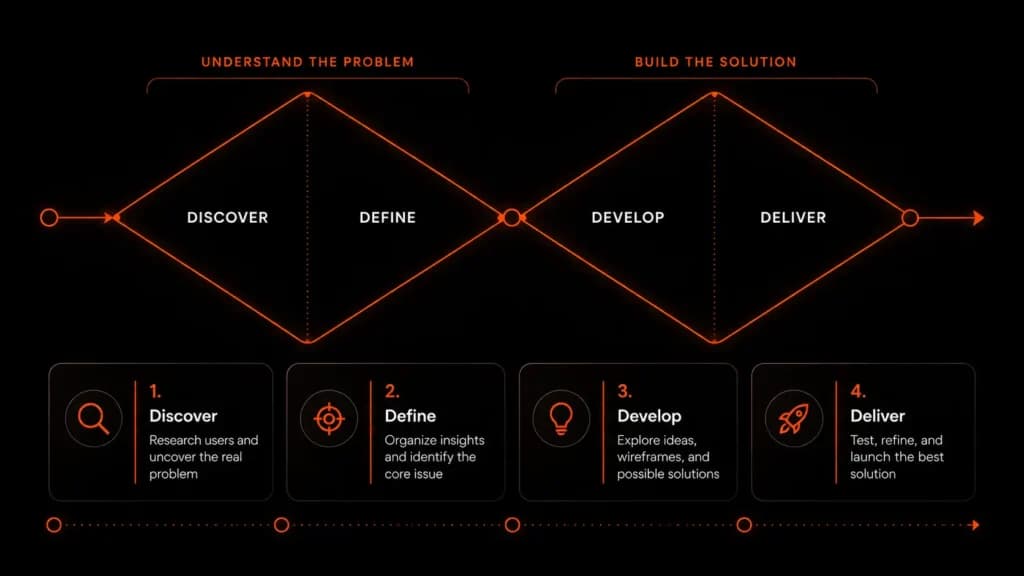
The Double Diamond is a simple UX design framework that helps teams solve the right problem before building the solution. It divides the work into two parts. First, you understand and define the problem. Then, you explore and deliver the best possible solution.
The process has four stages:
- Discover: Research users, collect feedback, study behavior, and understand the real problem
- Define: Organize the research and identify the core issue users are facing
- Develop: Explore ideas, create wireframes, test flows, and compare possible solutions
- Deliver: Finalize the design, test it with users, fix issues, and launch the improved experience
This framework is useful because many UX problems happen when teams rush into design too early. They start changing layouts, buttons, or colors without knowing what users actually need. The Double Diamond slows the process down in the right places.
For example, if users are not submitting a form, the first step is not redesigning the whole page. The better approach is to discover why users drop off. Maybe the form is too long, the labels are unclear, or users do not trust what happens after submission.
Once the real issue is defined, the team can develop better solutions. That may mean reducing fields, improving the headline, adding helper text, or showing a clearer confirmation message. After testing, the best version can be delivered with more confidence.
The Double Diamond keeps UX practical. It reminds teams that good design is not just about making things look better. It is about understanding the problem clearly, testing possible answers, and improving the experience based on real user behavior.
UX Principles Every Team Should Follow
UX principles help teams make better decisions. They keep the focus on users instead of personal preference. These principles work for websites, SaaS products, mobile apps, dashboards, forms, and almost every digital experience.
Start with the user. Every page, feature, and flow should support what the user needs to do. A design may look impressive, but if it does not help users move forward, it is not doing its job.
Keep things simple. Simple does not mean boring. It means removing unnecessary steps, unclear words, extra fields, and distracting elements. Users should not need to decode your interface.
Make the next step clear. Every screen should guide users toward a useful action. Use direct button text, helpful headings, clear labels, and logical page structure.
Stay consistent. Buttons, menus, forms, labels, and messages should behave the same way across the experience. Consistency makes products easier to learn and easier to trust.
Give feedback. When users click, submit, save, upload, or complete a task, they should know what happened. Success messages, loading states, progress bars, and helpful errors reduce uncertainty.
Common UX Mistakes
Many UX problems are simple but costly. They often hide in everyday parts of a website or product. Teams get used to them, but new users feel the friction immediately.
Common UX mistakes include:
- Slow loading pages
- Confusing navigation
- Unclear button text
- Long and tiring forms
- Poor mobile layouts
- Missing trust signals
- Weak error messages
- Too many choices at once
A slow page can lose users before they read your content. A confusing menu can stop people from finding important pages. A long form can reduce submissions. A poor mobile layout can damage the experience for a large part of your audience.
The best way to find these issues is to watch real users. Analytics can show where people drop off, but user testing shows why they drop off.
Why You Need a Professional Design Agency for Better User Experience
Good UX needs more than a clean layout. It requires research, strategy, design thinking, testing, and a clear understanding of how users behave. That is where a professional design agency can make a big difference.
Many businesses redesign their websites based on personal taste. They change colors, move sections, add animations, or copy competitors without knowing what users actually need. The result may look better, but the experience often stays the same.
A professional design agency looks deeper. They study your audience, review your user journey, find friction points, and design solutions based on real problems. Instead of asking only “Does this look good?” they ask, “Can users complete their goal easily?”
A good agency can help with:
- UX research and user journey mapping
- Website structure and information architecture
- Wireframes, prototypes, and usability testing
- Mobile-first design improvements
- Conversion-focused landing pages
- Clear navigation, forms, and call-to-action flows
- Brand-consistent visual design
This matters because users do not judge your website one section at a time. They experience the full journey. From the first click to the final action, every detail affects trust, clarity, and confidence.
For example, a service website may get traffic but very few leads. The problem may not be the offer. It could be unclear messaging, weak page structure, hidden contact options, or a form that feels too long. A design agency can identify those issues and rebuild the flow around user intent.
The same applies to SaaS websites, nonprofit pages, learning platforms, and eCommerce stores. Better UX helps people understand your value faster and take action with less friction.
You can improve small UX issues on your own. But when your website is tied to business growth, working with a professional design agency gives you a stronger foundation. You get strategy, design, and user behavior working together instead of relying on guesswork.
User Experience Examples Across Industries
UX basics apply to every industry, but the priority changes based on the product or website. A SaaS product, service website, education platform, nonprofit site, and eCommerce store all need good UX in different ways.
For SaaS products, UX should make onboarding simple. Users need to understand the product quickly, reach value fast, and find features without feeling lost. Clear dashboards, helpful empty states, and short setup flows can improve activation.
For service websites, UX should build trust and generate leads. Visitors need clear service pages, proof of work, simple contact options, pricing clarity, and easy booking paths.
For education websites, UX should support learning. Students need structured lessons, progress tracking, readable content, simple navigation, and mobile-friendly access.
For nonprofit websites, UX should make the mission clear and action easy. Donors and volunteers need impact stories, transparent information, simple forms, and a smooth donation process.
For eCommerce websites, UX should help people find products, trust the store, and complete checkout. Clear categories, strong product pages, useful filters, guest checkout, transparent shipping, and mobile-friendly payment flows can improve the shopping experience.
Simple UX Checklist
A UX checklist helps you review your website or product without overthinking. Start with the most important pages and flows, then look for obvious friction.
Use this checklist during your review:
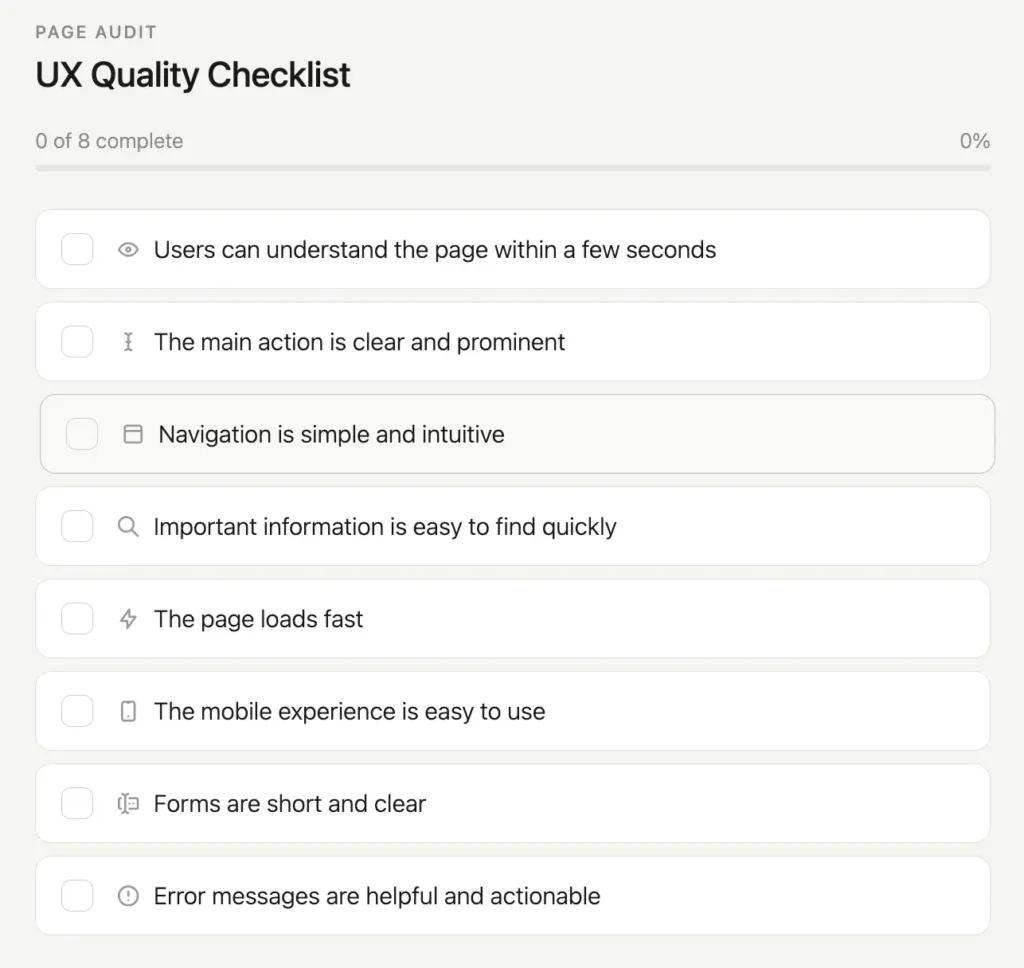
Page Audit
UX Quality Checklist
You do not need to fix everything at once. Pick the issue that affects the most users or blocks the most important action. Improve that first, measure the result, then move to the next problem.
Final Thoughts
User experience is about making things easier for people. When users can understand your website, trust your product, and complete tasks without confusion, they are more likely to stay, act, and return. Start with one page or flow, find the friction, fix it, and keep improving from real user behavior.