Generating an image is not the same as finishing creative work. The useful AI design tools are the ones that help after the first generation: editing, resizing, vector cleanup, brand consistency, typography, variations, and actual delivery. That is the filter behind this list.
Key Takeaways
- Canva AI is the strongest pick for high-volume creative work and editable multi-format marketing assets.
- Adobe Firefly is the strongest pick for AI-assisted creative production inside an Adobe-heavy workflow.
- Midjourney is the strongest pick for visual exploration, mood, art direction, and high-impact concept imagery.
- Recraft is the strongest pick for brand-consistent image, vector, icon, and design-system asset generation.
- Ideogram is the strongest pick for image generation where typography and graphic composition matter.
Judge the Workflow After Generation
The first generation is often the cheapest part of the job. The expensive part is getting ten assets on brand, in the right size, with clean typography, editable elements, consistent characters, and approval-ready variations. I gave more weight to that second half of the workflow.
What Faster Creative Work Really Means
- Generation quality
- Editing
- Brand consistency
- Batch variations
- Typography/vector support
- Delivery speed
Quick Comparison
| Tool | Best For | Biggest Strength | Watch Out For |
|---|---|---|---|
| Canva AI | High-volume creative work and editable multi-format marketing assets | For marketers and non-specialist designers, the value is range. | It is not a replacement for a dedicated product-design environment when you need sophisticated component systems, developer handoff, complex app prototyping, or detailed UX logic. |
| Adobe Firefly | Ai-assisted creative production inside an adobe-heavy workflow | The practical advantage is depth after generation. | For pure UI or product design, Firefly is a supporting creative tool rather than the place where the full interface system lives. |
| Midjourney | Visual exploration, mood, art direction, and high-impact concept imagery | Its strength is aesthetic range. | The output is not a structured UI file, design system, or editable component tree. |
| Recraft | Brand-consistent image, vector, icon, and design-system asset generation | The vector and brand-system angle matters. | It is not a product UI editor. |
| Ideogram | Image generation where typography and graphic composition matter | That makes it a useful creative companion for UI teams building hero concepts, launch visuals, or stylistic directions that need type integrated into the visual exploration. | Like Midjourney, it generates visual output rather than structured interface components. |
| Kittl AI | Quick brand, illustration, merchandise, and graphic-design production | The workflow is more production-oriented than a pure image generator because the AI output lives next to typography, layouts, templates, and editable graphic-design tools. | It is not intended for application UI, product flows, or developer handoff. |
1. Canva AI: Best for High-volume creative work
Product: Canva AI
Canva AI 2.0 pushes Canva beyond one-off image generation. The 2026 research preview is conversational and agentic, with layered editable outputs, brand intelligence, connectors, web research, scheduling, and Canva Code 2.0 inside the wider Visual Suite.
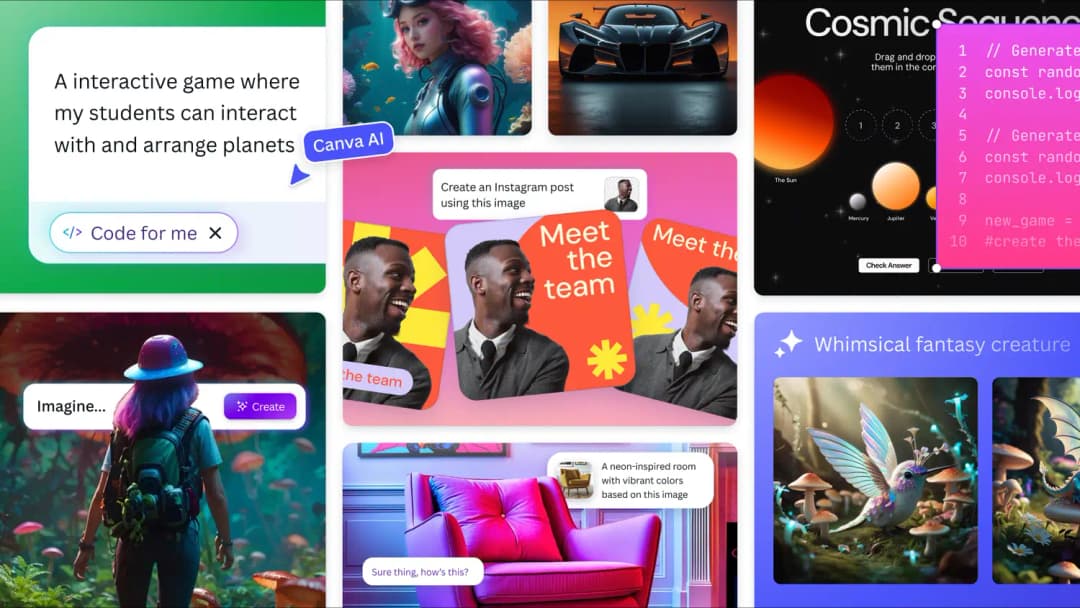
The first generation is not why Canva AI is here. The stronger case is what happens afterward: high-volume creative work and editable multi-format marketing assets, plus enough control to turn an idea into something deliverable.
For marketers and non-specialist designers, the value is range. A single workspace can move from a campaign brief to social assets, a deck, an interactive element, and resized variants without rebuilding the work in separate apps.
Where it fits best
Use Canva AI when high-volume creative work and editable multi-format marketing assets. It is particularly useful when that need is already visible in your current workflow and the team can measure whether the tool actually removes a handoff, shortens iteration, or improves the quality of the artifact.
The tradeoff
It is not a replacement for a dedicated product-design environment when you need sophisticated component systems, developer handoff, complex app prototyping, or detailed UX logic.
Current context: Canva says more than a quarter of a billion people use the platform every month, and its Magic Studio products have been used more than 16 billion times since 2023. Source
Image placement: Use a current in-product interface image showing Canva AI doing the job described above. Filename: best-ai-design-tools-creative-work-canva-ai.webp. Keep WebP under 100 KB.
2. Adobe Firefly: Best for Ai-assisted creative production inside an adobe-heavy workflow
Product: Adobe Firefly
Adobe Firefly is now much more than a text-to-image page. It combines image, video, audio, editing, partner models, and a 2026 AI Assistant that can orchestrate multi-step creative work across Adobe apps while keeping outputs editable.
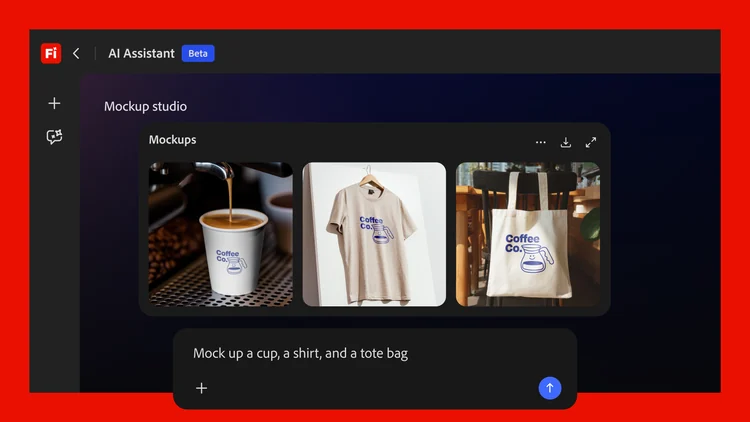
The first generation is not why Adobe Firefly is here. The stronger case is what happens afterward: AI-assisted creative production inside an Adobe-heavy workflow, plus enough control to turn an idea into something deliverable.
The practical advantage is depth after generation. A concept can continue into Photoshop, Illustrator, Premiere, Lightroom, or Express instead of ending as a flattened AI output.
Where it fits best
Use Adobe Firefly when AI-assisted creative production inside an Adobe-heavy workflow. It is particularly useful when that need is already visible in your current workflow and the team can measure whether the tool actually removes a handoff, shortens iteration, or improves the quality of the artifact.
The tradeoff
For pure UI or product design, Firefly is a supporting creative tool rather than the place where the full interface system lives. It is strongest for visual assets, campaigns, image editing, and multimodal production.
Current context: Adobe said in April 2026 that Firefly had expanded to more than 30 creative AI models across Adobe and partner providers. Source
Image placement: Use a current product workflow image showing Adobe Firefly doing the job described above. Filename: best-ai-design-tools-creative-work-adobe-firefly.webp. Keep WebP under 100 KB.
3. Midjourney: Best for Visual exploration, mood, art direction,
Product: Midjourney
Midjourney remains one of the strongest tools when the problem is visual direction rather than editable layout. It is fast for exploring moods, materials, environments, illustration styles, campaign concepts, and visual references before a designer commits to a direction.
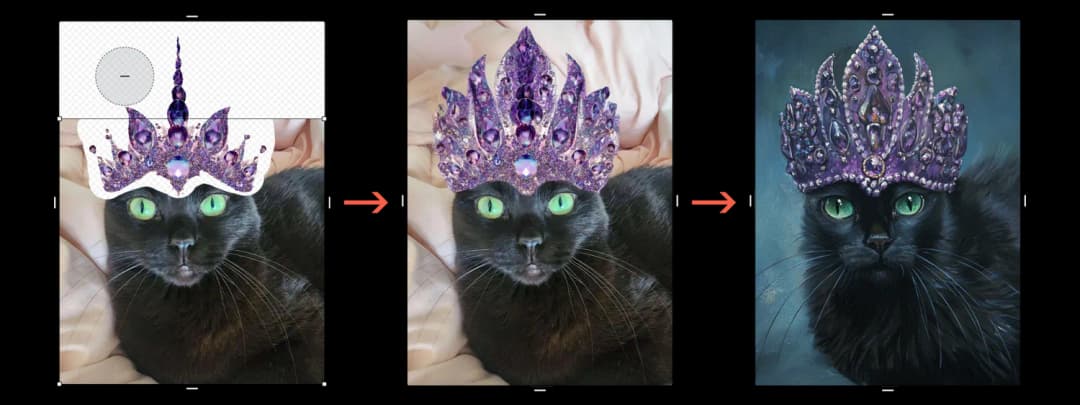
The first generation is not why Midjourney is here. The stronger case is what happens afterward: visual exploration, mood, art direction, and high-impact concept imagery, plus enough control to turn an idea into something deliverable.
Its strength is aesthetic range. For teams that need ten genuinely different visual territories instead of ten minor layout changes, it is a powerful ideation engine.
Where it fits best
Use Midjourney when visual exploration, mood, art direction, and high-impact concept imagery. It is particularly useful when that need is already visible in your current workflow and the team can measure whether the tool actually removes a handoff, shortens iteration, or improves the quality of the artifact.
The tradeoff
The output is not a structured UI file, design system, or editable component tree. You still need another tool to turn the visual direction into production design.
Current context: Midjourney made V8.2 the default model in July 2026, focusing on image quality, aesthetics, and personalization. Source
Image placement: Use a current in-product interface image showing Midjourney doing the job described above. Filename: best-ai-design-tools-creative-work-midjourney.webp. Keep WebP under 100 KB.
4. Recraft: Best for Brand-consistent image, vector, icon,
Product: Recraft
Recraft has carved out a useful place between generative imagery and practical design production. Its 2026 Design Agent can create a reusable kit that includes logo direction, color palette, typography, icons, and related brand assets, while the editor supports vector-focused work.
The first generation is not why Recraft is here. The stronger case is what happens afterward: brand-consistent image, vector, icon, and design-system asset generation, plus enough control to turn an idea into something deliverable.
The vector and brand-system angle matters. If the output needs to stay useful as an actual design asset rather than just serve as inspiration, Recraft often gives you a cleaner path than general image generators.
Where it fits best
Use Recraft when brand-consistent image, vector, icon, and design-system asset generation. It is particularly useful when that need is already visible in your current workflow and the team can measure whether the tool actually removes a handoff, shortens iteration, or improves the quality of the artifact.
The tradeoff
It is not a product UI editor. Use it to create and refine the visual ingredients that feed a UI, brand, or campaign workflow rather than to manage screens, flows, and developer handoff.
Current context: Recraft opened its Design Agent for testing in July 2026 and added direct vector editing to Recraft Studio the same month. Source
Image placement: Use a current product workflow image showing Recraft doing the job described above. Filename: best-ai-design-tools-creative-work-recraft.webp. Keep WebP under 100 KB.
5. Ideogram: Best for Image generation where typography
Product: Ideogram
Ideogram is especially useful for concept art, campaign visuals, posters, and other generated graphics where readable text and composition are part of the image rather than something added afterward.
The first generation is not why Ideogram is here. The stronger case is what happens afterward: image generation where typography and graphic composition matter, plus enough control to turn an idea into something deliverable.
That makes it a useful creative companion for UI teams building hero concepts, launch visuals, or stylistic directions that need type integrated into the visual exploration.
Where it fits best
Use Ideogram when image generation where typography and graphic composition matter. It is particularly useful when that need is already visible in your current workflow and the team can measure whether the tool actually removes a handoff, shortens iteration, or improves the quality of the artifact.
The tradeoff
Like Midjourney, it generates visual output rather than structured interface components. The result still needs to be translated into a design system or production layout.
Current context: Ideogram focuses on generative image creation with strong typography and graphic-design use cases. Source
Image placement: Use a current in-product interface image showing Ideogram doing the job described above. Filename: best-ai-design-tools-creative-work-ideogram.webp. Keep WebP under 100 KB.
6. Kittl AI: Best for Quick brand, illustration, merchandise,
Product: Kittl AI
Kittl combines template-driven graphic design with AI image, vector, and creative tools. It is useful for marketers and designers who need finished-looking campaign assets, merchandise concepts, logos, or illustrations without building every composition from scratch.
The first generation is not why Kittl AI is here. The stronger case is what happens afterward: quick brand, illustration, merchandise, and graphic-design production, plus enough control to turn an idea into something deliverable.
The workflow is more production-oriented than a pure image generator because the AI output lives next to typography, layouts, templates, and editable graphic-design tools.
Where it fits best
Use Kittl AI when quick brand, illustration, merchandise, and graphic-design production. It is particularly useful when that need is already visible in your current workflow and the team can measure whether the tool actually removes a handoff, shortens iteration, or improves the quality of the artifact.
The tradeoff
It is not intended for application UI, product flows, or developer handoff. Think creative asset production, not product interface design.
Current context: Kittl combines generative AI tools with an editable browser-based graphic-design workspace. Source
Image placement: Use a current product workflow image showing Kittl AI doing the job described above. Filename: best-ai-design-tools-creative-work-kittl-ai.webp. Keep WebP under 100 KB.
Which One Should You Choose?
Choose Canva AI if your priority is high-volume creative work and editable multi-format marketing assets. Choose Adobe Firefly if your priority is AI-assisted creative production inside an Adobe-heavy workflow. Choose Midjourney if your priority is visual exploration, mood, art direction, and high-impact concept imagery.
Choose Recraft if your priority is brand-consistent image, vector, icon, and design-system asset generation. Choose Ideogram if your priority is image generation where typography and graphic composition matter. Choose Kittl AI if your priority is quick brand, illustration, merchandise, and graphic-design production.
Do not choose from the feature count alone. Pick the tool that removes the next expensive handoff in your workflow. If it only gives you a faster first draft but creates more cleanup later, the speed is mostly cosmetic.
FAQs
What is the best best AI design tools for most teams?
For most teams, Canva AI is the safest starting point because it matches the central job of this list: high-volume creative work and editable multi-format marketing assets. The better answer can change quickly when your team has a strong platform, code, or workflow constraint.
Are free best AI design tools good enough?
Free plans are usually enough to test the workflow and judge first-result quality. The limits show up later in collaboration, AI credits, private projects, exports, version history, team controls, or production use. Test your real workflow before paying for a year.
Should AI replace the designer in this workflow?
No. AI is most useful for generating options, assembling first passes, translating structure, or automating repetitive edits. Problem framing, accessibility, product judgment, prioritization, and deciding which direction is actually right still need human ownership.
How should I evaluate these tools before buying?
Use one small real project. Give every candidate the same brief, the same existing assets, and the same correction request. Compare the second and third iterations, not just the first output. That exposes workflow friction much faster than a feature checklist.
Final Thoughts
The best best AI design tools is the one that makes the next decision cheaper. For this list, Canva AI is the strongest default, but the specialist options become better as soon as your constraint becomes specific. Match the tool to the output, handoff, and level of fidelity you actually need. That is how you get speed without simply moving the work somewhere else.
If you want help turning AI-assisted ideas into polished, conversion-focused design, Omnix Studio offers website UI/UX design and landing page design.