Omnix Studio editorial guide | Research reviewed October 13, 2026 | Examples and budgets are illustrative, not agency quotes.
The most expensive website isn’t always the one with the highest build price. Sometimes it’s the template that goes live in a weekend, then costs your team months of workarounds. Sometimes it’s the elaborate custom build that solves problems your business never actually had.
That is the decision behind custom website vs template. You aren’t choosing between a professional website and a cheap-looking one. You’re choosing how much of your website should be shaped around existing conventions, how much must adapt to your business, and who will maintain those decisions after launch.
For a five-page local services site, a carefully customized WordPress theme may be exactly right. For a business with unusual booking, customer portals, intricate integrations, or complex content relationships, a custom implementation can be easier to operate despite the larger initial investment. And plenty of businesses belong between those poles.
This guide compares the tradeoffs that actually matter: cost, launch time, design control, search visibility, performance, ownership, scalability, and everyday editing. You’ll also get a decision scorecard, three worked budgets, and a practical brief for comparing agency proposals. We don’t claim to have benchmarked every theme or builder, and the estimates below are planning models, not universal market rates.
Key takeaways
- A template-based website starts from an existing layout or theme, but can still have excellent copy, branding, performance, accessibility, and conversions when implemented well.
- A custom website is built around defined business requirements; custom design and custom functionality are separate choices, so you may need one without the other.
- The most useful middle ground is often a customized template or component-based build with selective custom development.
- The initial price is only one part of cost. Include content, integrations, migration, maintenance, performance work, and the cost of future changes.
- Neither approach is automatically better for SEO, faster, safer, or more accessible. Those outcomes depend on execution and ongoing maintenance.
- Before buying, test the hardest real workflow: an editor updating a page, a visitor completing a form, and a developer adding one unusual feature.
What is a template-based website?
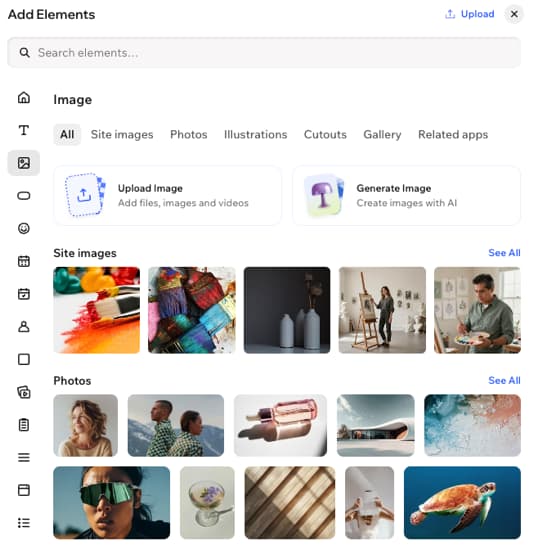
A template is a reusable starting structure. It may be a purchased WordPress theme, a WordPress block theme with patterns, a Webflow template, or a design inside a hosted builder such as Wix. It supplies an initial set of pages, sections, styles, and sometimes interactions. Your team replaces the demo content and adapts the system to your brand.
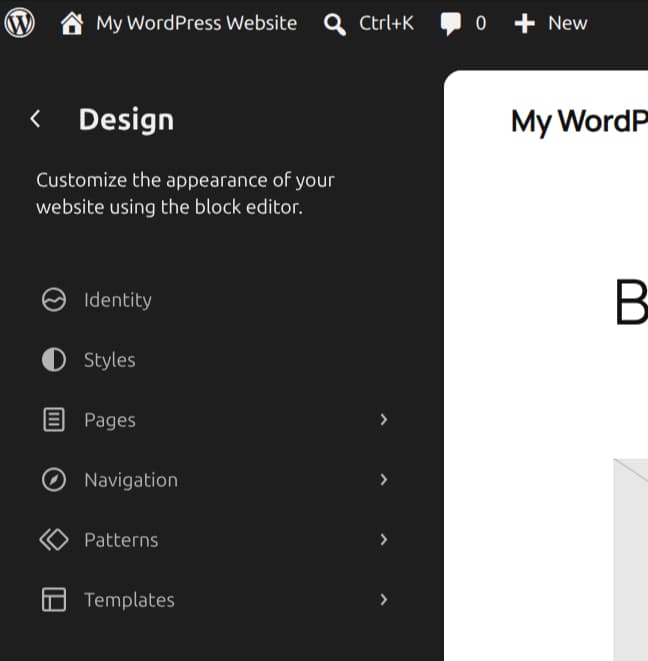
The word template covers very different levels of control. A WordPress block theme, for example, lets you edit templates, global styles, headers, and reusable patterns in the Site Editor. The WordPress documentation also describes synced patterns that update every place they are used. That means a modern template can provide a fairly robust design system, not just a fixed homepage. [1][2]
But platform details matter. Webflow allows code export on eligible paid Workspace plans, while CMS data and some functionality are not included in that export. Wix says a site’s underlying template cannot be swapped after creation, although its content and design can still be edited. The phrase ‘use a template’ does not tell you enough about portability or future redesigns. [3][4]
Template is a good fit when: the business has standard pages, familiar content structure, short deadlines, a limited budget, and no complicated feature requirements. A solo consultant, early-stage service company, or simple product landing site may not need bespoke engineering.
Where trouble starts: buying on the attractiveness of a demo instead of testing navigation, mobile layout, forms, content editing, plugin compatibility, and the actual licensing terms. Removing sample sections and repairing an inflexible information architecture can eat the savings quickly.
What is a custom website?
A custom website begins with the company’s needs rather than the structure of a preset demo. A team may research users, define page types and content models, design reusable components, implement the frontend, connect integrations, and test the live workflows. Custom work can mean a bespoke WordPress theme, a Next.js frontend, a tailored Shopify storefront, or a proprietary application integrated with the website.
Here’s the important distinction: custom design does not require a custom CMS, and custom functionality does not require every page to be designed from scratch. You can have unique visual components on WordPress’s editorial system. You can also keep a polished standard theme and build only a specialized booking or quoting flow. These hybrids often make more financial sense than treating every project as a ground-up rebuild.
A custom build buys control, not magical quality. A poorly scoped custom website can be slow, inaccessible, difficult to update, and dependent on a single contractor. Code ownership alone is not enough if the client cannot obtain documentation, credentials, licenses, and a workable handoff.
Custom is a good fit when: your differentiator is part of the website experience, you have unusual data or business rules, need multi-role accounts, rely on several systems, or need editorial patterns that off-the-shelf solutions can’t support reliably.
Where trouble starts: letting creative preferences drive the architecture while the underlying requirements remain untested. Write down the business outcome, content model, acceptance criteria, and success metrics before funding an extensive build.
Custom website vs template: the comparison at a glance
The following table focuses on typical workflows rather than promises about speed or rankings.
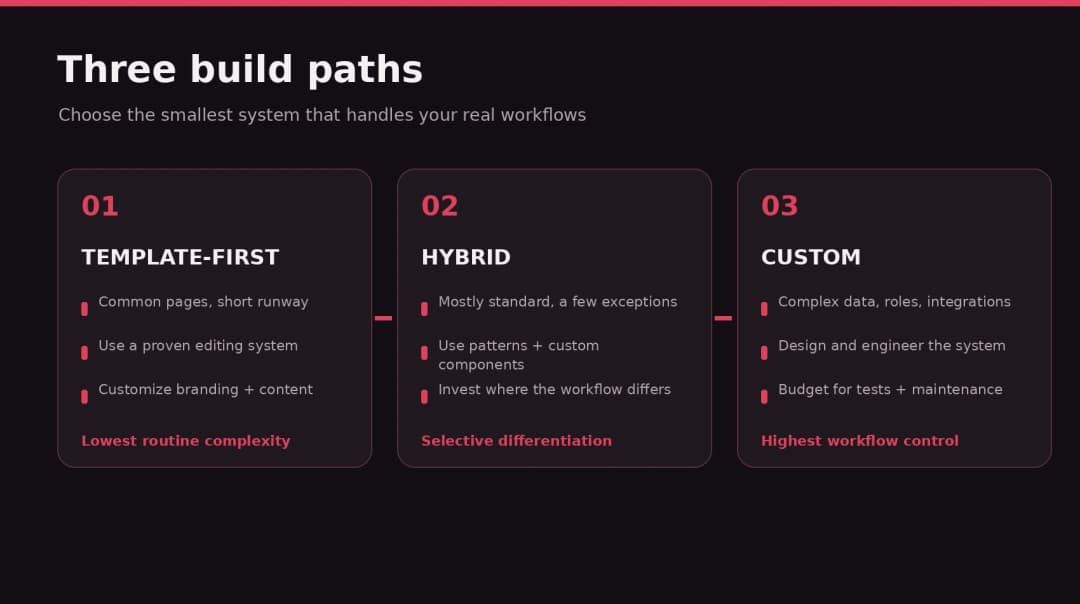
| Decision factor | Template-first approach | Custom approach | Hybrid approach |
|---|---|---|---|
| Initial scope | Existing layout and components | Requirements-led design and implementation | Existing foundation plus targeted custom work |
| Launch effort | Often lower for standard pages | Usually higher planning and QA effort | Between the two; varies by integrations |
| Visual flexibility | Depends on theme and builder | Broad control, within budget | Distinctive key pages, standard routine pages |
| Complex functionality | Apps/plugins or workarounds | Built around workflows and integrations | Custom functionality where it pays off |
| Content editing | Can be straightforward if configured well | Must be designed into the solution | Reusable patterns with custom content types |
| Ownership | Depends on platform, license, and export | Depends on contract and repositories | Mixed; verify each dependency |
| Long-term changes | Easy within the system’s assumptions | Flexible with sound architecture and support | Flexible in high-value areas |
Neither column is a trophy. A carefully built theme with a well-designed content system can outperform a rushed custom build on almost every meaningful measure.
1. Cost: look beyond the sticker price
Clutch’s September 2026 pricing guide lists agency web-design project pricing in a broad $2,000–$100,000 range. It also reports that most reviewed projects were under $10,000 and that shortlisted companies commonly quote $100–$149 per hour. These data reflect Clutch’s sample and methodology, not an apples-to-apples template-versus-custom price study. [5]
Why does custom generally cost more? Research, original design decisions, reusable component development, integrations, accessibility testing, QA, and documentation take time. A template saves some of that work up front because someone else has already designed and built the starting system. But the saved hours can disappear if a template clashes with the business requirements.
Three illustrative website budgets
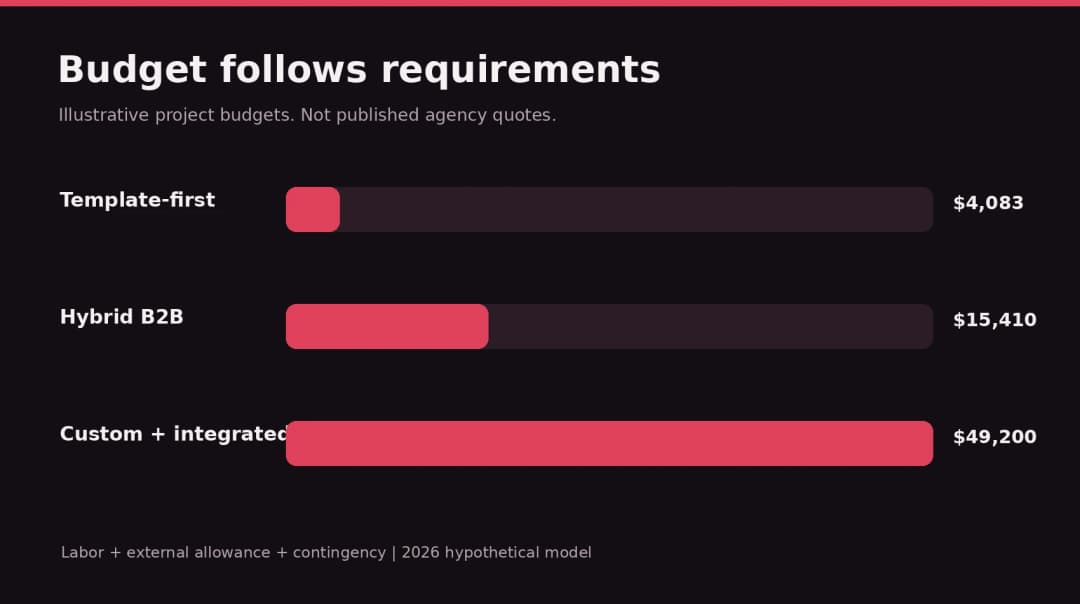
These scenarios use transparent assumptions so you can replace them with your own estimates. The rates are hypothetical blended project rates, not verified offers from Omnix Studio or representative global market averages. Calculations include implementation, an external-cost allowance, and contingency; taxes, ongoing retainers, and platform-specific license terms are not included.
| Scenario | Labor calculation | External allowance | Contingency | Illustrated project budget |
|---|---|---|---|---|
| Template-based five-page site | 55 hr × $60 | $250 | 15% of subtotal | $4,083 |
| Hybrid 12-page B2B site | 170 hr × $75 | $650 | 15% of subtotal | $15,410 |
| Custom platform-connected site | 390 hr × $100 | $2,000 | 20% of subtotal | $49,200 |
Rounding: $3,550 × 1.15 = $4,082.50, displayed as $4,083; $13,400 × 1.15 = $15,410; $41,000 × 1.20 = $49,200.
The first scenario assumes content is mostly prepared and forms are simple. The second includes page architecture, custom landing sections, CRM integration, and migration checks. The third includes original frontend components, complex integration logic, role-based workflows, and more extensive testing. None of these budgets promises what a real agency will charge.
Cost of ownership over three years
A project doesn’t stop costing money when it launches. Budget for hosting, domains, premium software, backups, content updates, security maintenance, analytics, accessibility fixes, conversion testing, and ordinary enhancements. If you plan to replatform after year one, that needs a place in the model too.
A practical comparison is three-year total ownership = launch cost + 36 months of operations + planned improvements + migration/rebuild reserve. If your template costs $4,083 to build but needs $350 per month of operations and $5,000 of rework, the total is $21,683 before unforeseen expenses. If a custom site costs $49,200 and $600 per month of operations, its comparable three-year figure is $70,800 before improvements. The cheaper answer depends on which capabilities the business actually needs, not on selecting the larger number.
2. Time to launch: does speed help the business?
Templates often allow a faster start because typography scales, responsive sections, headers, and page structures exist. That advantage is real when your content maps naturally to those structures. But a website isn’t done merely because the homepage renders. Writing copy, gathering imagery, wiring forms, checking mobile behavior, and coordinating approvals can still take longer than the theme configuration.
Custom work usually demands more discovery and design time. That may be justified if a wrong workflow would be costly to replace later. A membership portal, booking experience, account dashboard, or unusual product catalog needs more than a visually acceptable homepage.
Try a one-week proof of concept before final selection: build the actual hardest page on the proposed platform, let a nontechnical editor update it, and assess whether the next five similar pages would be easy or awkward. For many small businesses, that test is more useful than arguing about theoretical development times.
3. Branding: originality isn’t the same as effectiveness
A template-based website doesn’t have to look generic. Distinctive product photography, strong messaging, thoughtful typography, custom illustrations, and purposeful layout choices can create a recognizable brand inside a reusable system. Conversely, a bespoke site can still look derivative if it follows every design trend without a strong point of view.
The decision isn’t simply ‘can we change the colors?’ Ask whether the site needs uncommon interactions, a special content hierarchy, or an unusually important storytelling sequence. If your biggest differentiation lies in your offer, results, and customer service, spending more on content and photography may deliver more value than custom animation.
If a template’s structure forces three important buying questions below the fold, or hides critical filters behind awkward workarounds, you may have reached the point where a custom layout earns its place. Keep a design decision log that links each unusual element to a user need.
4. SEO: neither approach has automatic ranking privileges
Search engines don’t rank a page simply because it was built from scratch. Useful content, crawlability, information architecture, mobile behavior, internal links, performance, and canonical/redirect choices all matter. A template can support those priorities if it exposes suitable metadata, clean markup, accessible navigation, and editable page structures. Custom code creates opportunities but can also introduce broken rendering, duplicate pages, and JavaScript-heavy problems.
For an existing business, a website redesign is also a migration risk. Google’s site-move documentation advises creating an old-to-new URL map when URLs change, implementing appropriate permanent redirects, updating internal links and sitemaps, and reviewing indexing controls. It also warns that visibility can fluctuate during migrations. [6]
A red flag in any proposal is ‘we’ll redesign everything and sort SEO out after launch.’ That isn’t a launch strategy. Agree on an inventory of existing URLs, valuable landing pages, metadata, media, canonical behavior, redirects, and analytics before replacing the site. This is equally important with WordPress, Wix, Webflow, or a custom framework.
For a detailed process, see Omnix Studio’s migration guide when published. Until then, use the official Search Central documentation rather than linking to an unpublished October article.
5. Performance and accessibility: test implementation, not labels
Many template demos look fast because they contain almost no real content. Many custom demos look fast because they omit the third-party scripts that will be deployed later. Neither proves production performance. Google’s Core Web Vitals defines good targets at the 75th percentile: Largest Contentful Paint of 2.5 seconds or less, Interaction to Next Paint of 200 milliseconds or less, and Cumulative Layout Shift of 0.1 or less. [7]
Test candidate pages with realistic photography, analytics scripts, forms, font loading, and mobile connectivity. For accessibility, review semantic headings, visible keyboard focus, contrast, reduced motion, form labels, errors, and interaction state. Budget accessibility review separately if you serve audiences with significant regulatory or operational requirements.
An effective brief names measurable acceptance criteria, not empty promises like ‘100 PageSpeed’ or ‘SEO optimized.’ Ask your agency to explain how it will measure real-user performance after launch, not just a single lab score.
6. Editing and ownership: who holds the keys?
One of the biggest hidden risks is an editor experience designed only for the developer. A marketing team may need to publish articles, launch campaigns, change testimonials, update pricing, and add staff profiles every week. Those changes should be possible without rebuilding the frontend each time.
WordPress block themes can provide visual template editing and reusable patterns. Webflow’s documentation says exported HTML/CSS/JS is possible under eligible Workspace plans but omits CMS collections and certain runtime features. Wix’s help center says templates cannot be replaced on an existing site without starting a new one. These differences aren’t reasons to dismiss either platform; they are reasons to ask what happens when you want to change vendors or architecture. [1][3][4]
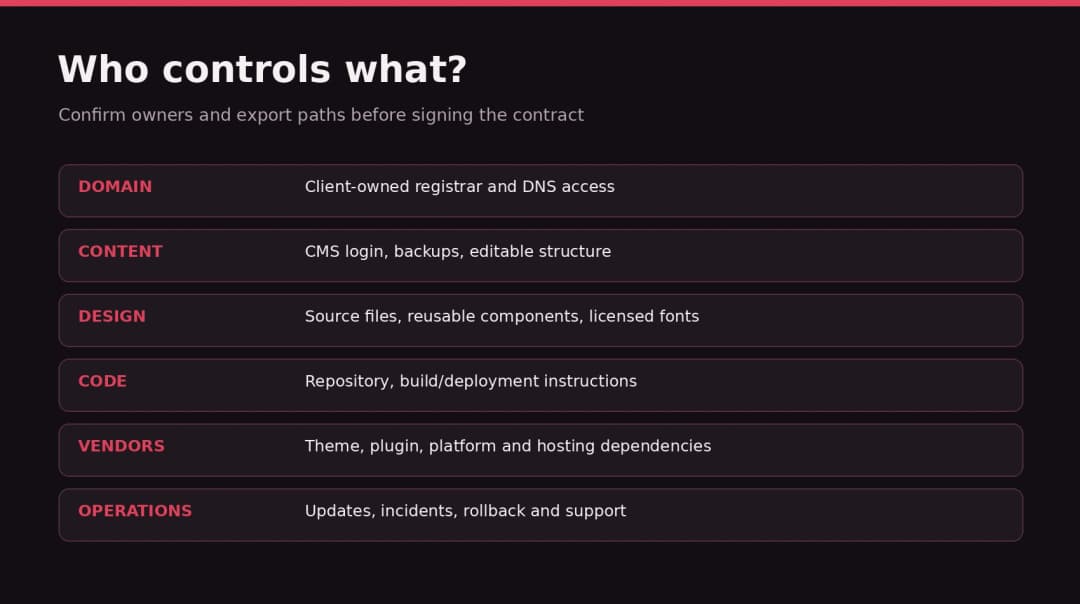
Put ownership in the contract: domain registrar, hosting account, design files, code repository, license keys, API credentials, analytics properties, backups, and documentation. Define what is portable, what is a renewable vendor subscription, and what requires a rebuild if you leave.
Handoff test: have someone outside the development team edit a service page, add a new offering, and revert an incorrect change. If that requires a developer, record the ongoing cost instead of pretending self-service editing is included.
7. Scalability: design for the next realistic stage
Scalability doesn’t mean choosing an elaborate architecture for traffic that does not exist. A business brochure site should not be built like a social network. It means understanding likely growth: five service pages becoming fifty, one location becoming several, standard contact forms becoming conditional lead qualification, or a small shop adding subscriptions and inventory workflows.
Templates often scale well within their intended content model. If pages are variations of a common layout, reusable patterns can improve consistency and make updates faster. Custom architecture becomes more valuable when the relationships and rules change: different customer roles, permission boundaries, custom inventory, complex integrations, or real-time application functionality.
Ask a concrete growth question: ‘What would it take to support three new locations and 80 service pages next year?’ The answer should include editor work, data modeling, indexing, QA, and any additional licenses. Build for plausible growth, not imaginary enterprise scale.
8. Choosing WordPress, Webflow, Wix, or a custom stack
The platform matters independently of whether you start with a template. WordPress offers open-source themes, block-based patterns, plugins, and ownership choices; its flexibility also creates responsibility for updates, plugin quality, hosting, and security. Webflow offers visual layout and CMS tools with a hosting-centered workflow, but code export has specific exclusions. Wix simplifies hosted site management while retaining platform-specific template and export boundaries. A custom React/Next.js build is appropriate when a team can operate its frontend, deployment, data services, and editorial tooling responsibly.
Don’t frame this as a race for the most ‘advanced’ tech stack. Define your required workflow and staffing. If marketing needs to ship content without developers, make the CMS demonstrable before signing. If the site is effectively a software product, treat data security, application testing, logging, and deployment rollback as first-class requirements.
A hybrid can make sense too: WordPress for an editorial site, with custom blocks and one tailored calculator or customer portal; or a separate application linked to a conventional marketing site. Architecture should follow the work people need to do.
9. Which option fits your business? Three realistic scenarios
Scenario A: a new local service company
A local cleaning or accounting business needs a homepage, four service pages, team details, testimonials, location/contact information, and a lead form. The content is largely conventional, and the owner wants updates without development support. Recommendation: a high-quality template with thoughtful customization. Spend the savings on messaging, original photography, local content, analytics, and working forms. Require mobile QA and a clear maintenance handoff.
Scenario B: a growing B2B firm with demanding campaigns
A consulting business has a distinctive brand, multiple industries, location-specific landing pages, CRM attribution, downloadable resources, and a marketing team publishing weekly. Recommendation: hybrid. Use a reliable CMS foundation with a custom design system for the key conversion pages, structured content types, and an intentional integration layer. Avoid building a custom CMS unless there is evidence the current platforms can’t support the workflow.
Scenario C: a product business with unusual customer journeys
A software company needs account-specific dashboards, multi-role permissions, custom onboarding, entitlement checks, and deep billing integrations. The marketing site may still be template-friendly, but its application requires careful product architecture. Recommendation: custom application functionality, possibly paired with a simpler CMS-powered public website. Don’t force application behavior into a marketing theme just because the theme looked attractive on demo day.
10. The practical decision framework: score your actual needs
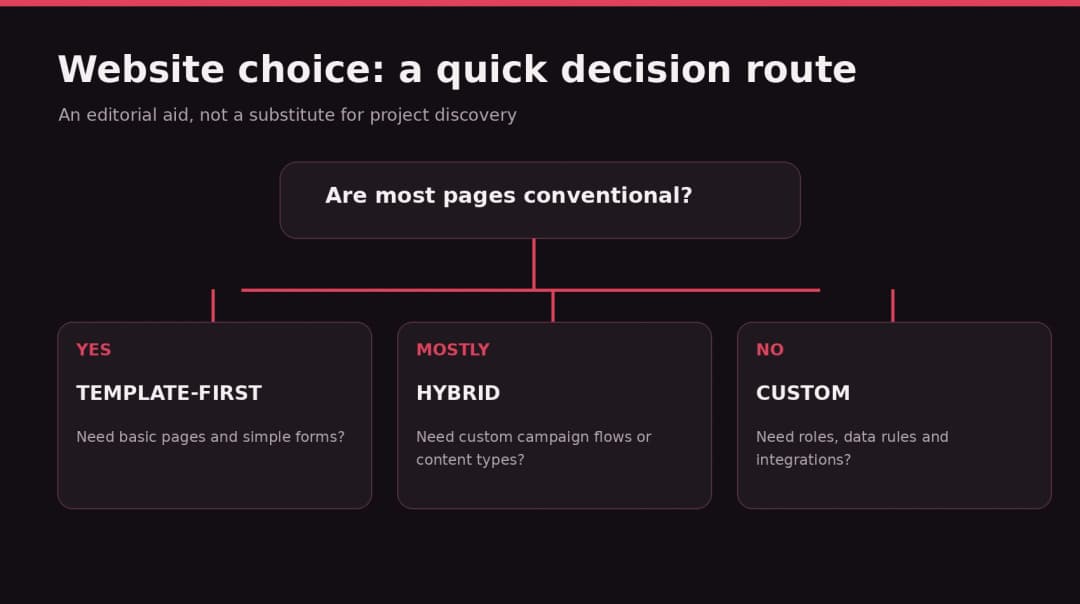
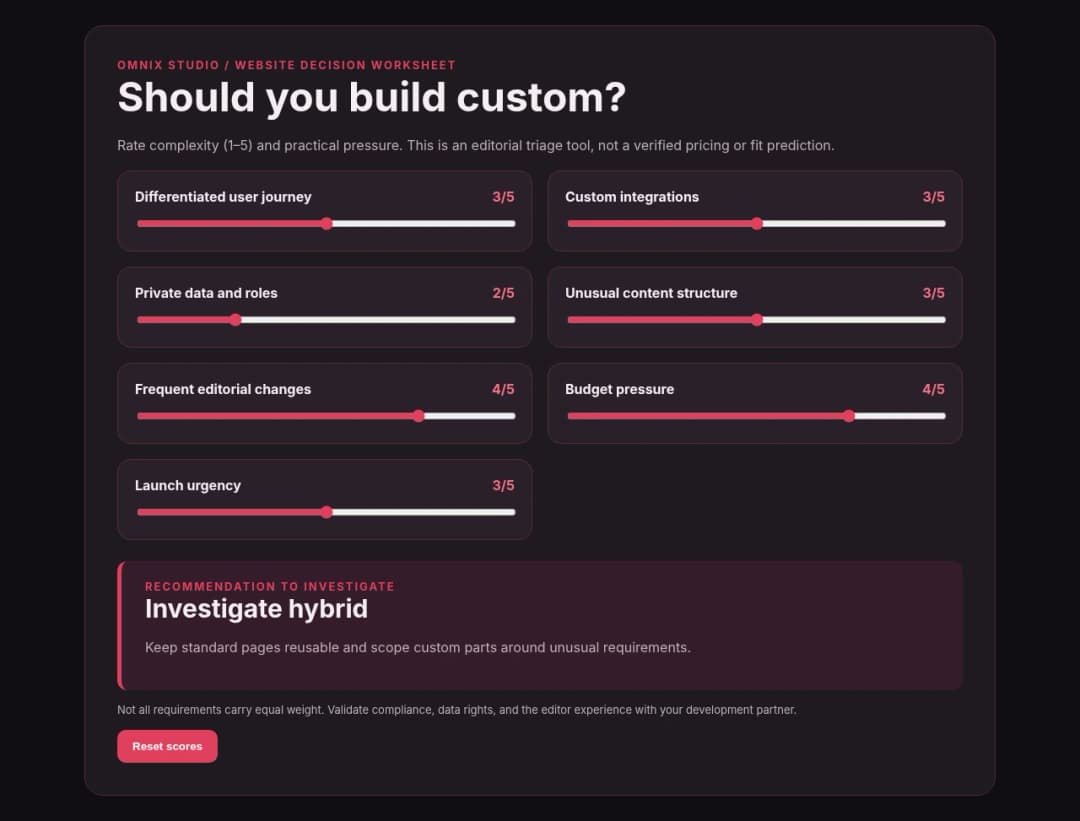
Use the included scorecard rather than choosing by aesthetics alone. Rate each dimension from 1 (simple/low importance) to 5 (complex/mission critical): differentiated UX; content editing; integrations; permissions/data; future changes; budget pressure; and time pressure. Then write down the evidence for each rating.
One example: a site with straightforward pages, no private data, few integrations, and severe budget pressure is usually template-friendly. A site with custom permissions, complex data, high integration risk, and an in-house engineering team is more likely to justify custom work. If complexity is concentrated in one or two areas, a hybrid is worth pricing.
Important: This is an editorial triage tool, not a validated algorithm. A high score does not prove custom is the right answer; discuss the risks and actual implementation proposal with a qualified team. The downloadable decision worksheet forces you to record the hardest workflow and the ownership requirements before committing.
11. What to ask before hiring a web design agency
A useful proposal does more than show an attractive hero. Ask for a line-by-line scope with included pages, unique templates, integrations, content population, migration, accessibility and performance testing, analytics, training, postlaunch support, and acceptance criteria. Clarify whether the project includes copywriting, photography, premium tools, licensed fonts, consent management, security reviews, and ongoing maintenance.
Ask to see the editor experience, not only the polished frontend. Request an explanation of what can be changed without developers and what breaks when a plugin or platform plan changes. For a redesign, request an SEO preservation plan. For custom code, ask about repository access, tests, backup, staging, rollback, and a handoff another developer can understand.
A proposal with the lowest headline number can be more expensive if key work is marked ‘out of scope.’ Use the included agency comparison worksheet to normalize assumptions, not to force vendors into identical architectures.
12. The smartest middle ground: start with constraints, customize deliberately
Most growing businesses don’t need a philosophical commitment to ‘template’ or ‘custom.’ They need a site that represents their brand, helps visitors complete meaningful actions, and can be operated without constant emergency fixes. The hybrid approach starts with a stable platform and makes selective custom investments where they improve conversion, workflow, or maintainability.
For WordPress, that may mean a block theme plus tailored patterns, custom fields or content types, and a small amount of targeted code. For Webflow, it may mean a managed visual design system with carefully configured CMS collections. For a SaaS business, it may mean separating the marketing site from its login-based application. A great implementation is the least complicated one that meets the real requirements.
At Omnix Studio, our work spans web design, WordPress development, UX, and custom web builds. If you’re unsure what needs to be custom, start with a focused scope and architecture review rather than commissioning a complete rebuild on day one. Explore our work and services at https://omnixstudio.co/services/ (verify the exact service URL before publication).
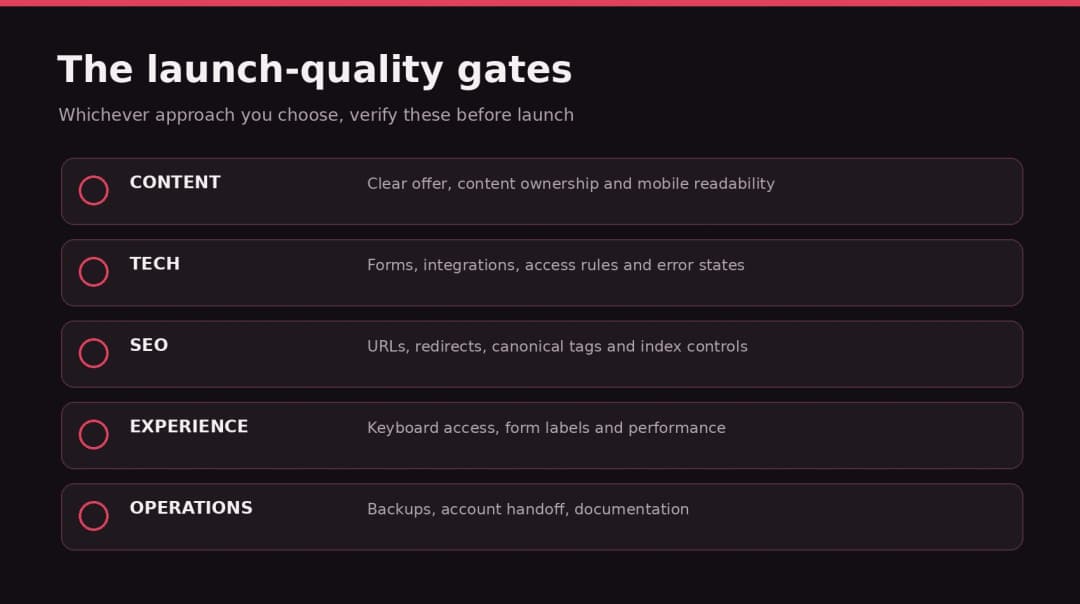
A simple prelaunch checklist
- The website’s main audience and highest-value action are defined.
- Page types, forms, data and integrations are documented.
- Editors can complete three routine updates without developers.
- All final costs include licensing, migration, and operating expenses.
- Mobile navigation, forms, and content are tested with realistic data.
- Accessibility basics and Core Web Vitals are reviewed on representative pages.
- SEO-critical URLs, content, metadata, and redirects are checked.
- Domain, hosting, design files, and repository ownership are documented.
- Backups, update responsibilities, and postlaunch support are agreed.
- The platform decision follows demonstrated requirements rather than a fashionable trend.
FAQs
Is a custom website better than a template?
Not automatically. Custom is useful when the website must support distinct user journeys or functionality that an existing system cannot handle responsibly. A well-implemented template is often the better investment for standard informational websites.
Are template websites bad for SEO?
No. Templates don’t inherently prevent search visibility. They must still support crawlability, metadata, internal links, useful content, accessible navigation, and good page performance. A poorly built custom site can create the same problems.
Can a template website look unique?
Yes. Brand photography, strong content, typography, layout choices, and selective custom components can create a distinctive website without building every component from scratch.
Can I move a template site to another platform later?
Sometimes, but portability depends on the platform and features in use. For example, Webflow’s export omits CMS functionality and Wix restricts changing the underlying template of an existing site. Confirm exports, data ownership, and migration effort before selecting a platform. [3][4]
How much does a custom website cost compared with a template?
It varies dramatically with content, integrations, agency rates, and functionality. Clutch’s broad web-design data provides context but doesn’t isolate the cost premium for custom sites. Compare itemized quotes for the same required outcomes, including three-year operations and planned changes. [5]
Is WordPress suitable for a custom website?
Yes. WordPress can support custom themes, blocks, patterns, content structures, integrations, and bespoke frontends. You can also use it as a familiar editorial system while customizing the public experience.
When is a hybrid website best?
When most pages follow common patterns but a smaller set of experiences demands unusual design or business logic. Invest in custom work where the business case is clear, while retaining a stable editorial foundation.
Research and official references
[1] WordPress Site Editor and patterns — https://wordpress.org/documentation/article/site-editor/
[2] WordPress Block Patterns — https://wordpress.org/documentation/article/block-pattern/
[3] Webflow code export coverage and limitations — https://help.webflow.com/hc/en-us/articles/33961386739347-How-do-I-export-my-Webflow-site-code
[4] Wix official template switching guidance — https://support.wix.com/en/article/building-a-website-for-free
[5] Clutch Web Design Company Pricing Guide, updated September 21, 2026 — https://clutch.co/web-designers/pricing
[6] Google Search Central site moves — https://developers.google.com/search/docs/crawling-indexing/site-move-with-url-changes
[7] Google Core Web Vitals metrics — https://web.dev/articles/vitals
Editorial disclosure: this guide is based on reviewed vendor and standards documentation plus reasoned scenario analysis. No paid tool benchmarks, measured conversion uplifts, or client case studies are claimed. All numerical budgets are hypothetical assumptions for planning, not fixed quotes.