Omnix Studio editorial guide | Research reviewed October 13, 2026 | Comparison based on official product documentation, not paid-account benchmarking.
The fastest way to create a website in 2026 is to ask AI to make one. The harder part is deciding whether you can still run that site six months later. Can your team publish new pages without breaking the design? Does the booking form reach the right inbox? Can you migrate the content if you change platforms? What will you pay after introductory pricing expires?
These questions separate an impressive generated preview from a business website worth keeping. The best AI website builder is not necessarily the one that finishes a hero section in the fewest seconds. It is the one that gives your business the right mix of editing control, publishing workflow, functionality, predictable costs, and room to grow.
We compared seven established options: Wix Harmony, Framer, Webflow, Squarespace Blueprint AI, Hostinger AI Builder, 10Web, and Durable. Rather than inventing a universal winner or claiming a controlled product test we did not conduct, this guide maps their documented capabilities to practical use cases. Pricing and rollout restrictions should be verified again before subscribing.
Key Takeaways
- Wix Harmony is a sensible starting point for service businesses that want an AI-generated site, visual editing, and native business features in one ecosystem.
- Framer stands out for design-led marketing sites, portfolios, precise visual iteration, and publishing from an editable canvas.
- Webflow fits design teams and agencies that need structured multi-page sites, reusable design patterns, and greater control over site architecture. Its AI builder has important new-site restrictions.
- Squarespace Blueprint AI is well suited to creative businesses looking for guided brand decisions and a cohesive template-based site.
- Hostinger AI Builder is worth considering when simplicity, hosted setup, and a choice between visual and prompt-driven workflows matter most.
- 10Web offers an AI-first route toward a WordPress-based website, making it relevant to organizations already planning around the WordPress ecosystem.
- Durable is aimed at small service businesses that want a quick public presence and business-management tools rather than a design-heavy custom site.
- No platform should be declared the “fastest,” “best converting,” or “most SEO-friendly” without a reproducible test on comparable published sites.
AI Website Builder vs. AI App Builder: Know What You Are Buying
An AI website builder usually helps generate and maintain public-facing pages: a homepage, service pages, portfolio, blog, store, booking page, or contact page. Its job is to make content, design, navigation, and publishing manageable.
An AI app builder is better judged by user accounts, databases, application logic, APIs, workflows, and software deployment. Some products increasingly cross the boundary, but the distinction helps keep the shopping list useful. A bakery needs a credible menu and online ordering; a SaaS startup may need account-level permissions and an API. Those are different projects.
For app-centric products, our existing guide to AI frontend tools covers platforms such as v0, Lovable, and Bolt. The tools here focus on the website itself: how it is created, edited, published, and operated by a real business.
How this comparison was researched
We reviewed current official marketing pages and help-center documentation for the seven products, including Wix’s Harmony editor, Webflow’s September 2026 AI site-builder limitations, Framer’s AI canvas agent, and Hostinger’s combined Manual and Agentic modes. We also reviewed Squarespace Blueprint guidance and 10Web’s current builder description. Sources are listed at the end.
This is an evidence-led editorial comparison, not a controlled hands-on benchmark. We did not create and publish seven paid sites under identical conditions, so we do not report invented page-speed scores, generated-output rankings, conversions, or support-response times. Where a feature is platform-advertised, we say so. Where a choice is our editorial judgment, we explain the reason.
The Seven Builders at a Glance
| Platform | Best fit | AI starting point | Editing approach | Main consideration |
|---|---|---|---|---|
| Wix Harmony | Service and local businesses | Conversational site creation with Aria | AI assistant plus visual editor | Confirm feature availability and subscription requirements |
| Framer | Design-led marketing and portfolios | AI canvas agent generates pages and sections | Fine-grained visual canvas | Advanced non-website functionality may require another system |
| Webflow | Agency-managed and scalable marketing sites | AI multi-page site creation | Visual designer, CMS and components | AI generator is restricted to new or previously AI-generated sites |
| Squarespace Blueprint AI | Creative brands and solo businesses | Guided brief and brand choices | Fluid Engine and site styles | Blueprint is desktop-only |
| Hostinger AI Builder | Small businesses seeking simplicity | Manual or Agentic creation | Drag-and-drop or conversational editing | Examine plan limits and whether advanced workflows fit |
| 10Web | WordPress-oriented sites | Prompt, URL, or Figma route | AI editor and WordPress path | Verify resulting site control and hosting/migration terms |
| Durable | Solo service operators | Prompt-driven business-site setup | Guided site and business tools | Less suited to elaborate agency design systems |
The table measures workflow fit, not numerical performance. A vendor’s claimed speed or SEO optimization is not a substitute for measuring the published website.
1. Wix Harmony: Best for a Business Site With Built-in Operations
Best for: local service businesses, independent professionals, and small companies that want the website and everyday business tools under one roof.
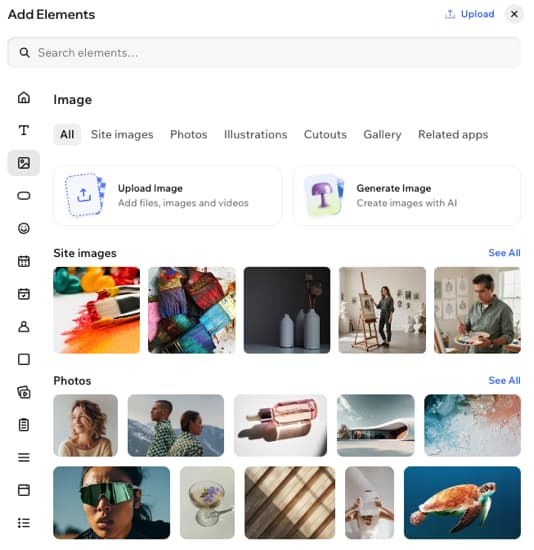
Wix describes Harmony as its latest AI website-building experience. A business owner supplies a brief, works with the Aria AI assistant, and can manually adjust the generated layout. Wix’s documentation explains how AI can create site design and pages, then leave the owner to refine details inside the visual editor. The company positions scheduling, ecommerce, marketing, and business functions as part of its broader ecosystem. [1][2]
This matters when the site is not just a marketing brochure. A salon might need a services page, booking flow, map, customer inquiry form, and follow-up emails. A tool that helps operate those workflows may be more valuable than one that produces a more sophisticated first-screen animation.
What we like about the fit: Wix brings AI generation close to the routine jobs a nontechnical owner expects to do: edit a service, publish a page, update hours, or connect a business feature. Its AI-to-manual editing handoff is a central product promise.
What to check: Verify which Harmony features are available for your account and plan. The company’s help center explicitly warns that AI suggestions can be inaccurate or unexpected. Audit generated service descriptions, opening hours, pricing, legal claims, and image rights rather than trusting draft copy. [2]
A good pilot: Create a five-page local service site with a booking action, FAQ, contact form, and location details. Ask a nontechnical colleague to update the price of one service and then find that change on the published site.
Official sources: https://www.wix.com/ai-website-builder and https://support.wix.com/en/article/wix-harmony-editor-creating-a-site-with-ai
2. Framer: Best for Design-Led Marketing Websites
Best for: creative agencies, designers, startups, product marketing teams, and founders who care about the quality and editability of the final visual experience.
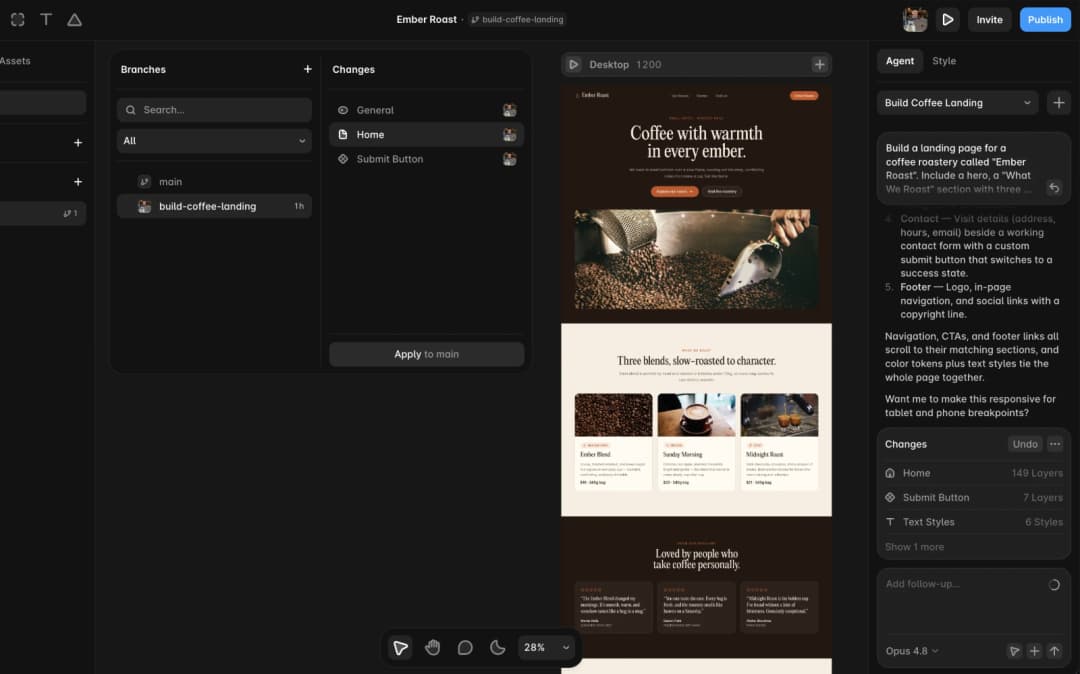
Framer’s 2026 AI experience is built around agents working on an editable canvas. You can describe the page, section, or change you need; an agent creates editable layout, copy, and visuals inside the project, and you can refine the result directly. Framer’s official site specifically highlights responsive breakpoints, components, typography, styling, and publishing from the same environment. [3]
This is a stronger proposition than “AI makes a template.” The transition from first draft to human design refinement is part of the workflow. A brand team can generate an early campaign structure, then adjust the visual hierarchy, spacing, animation, and CMS presentation before a page reaches real visitors.
Where Framer earns its place: Design teams can continue improving the same artifact instead of exporting a static mockup into a different website editor. For portfolios and marketing experiences, that continuity makes iteration easier.
What to check: Complex membership logic, large custom data workflows, deep ecommerce requirements, or elaborate third-party operations may push you beyond what a website-first designer wants to maintain. Verify the exact CMS limits, localization requirements, analytics integrations, and plan-level publishing capabilities.
A good pilot: Build an agency homepage, a work-detail CMS item, and an article page. Test desktop/tablet/mobile layout, then ask a content editor to publish a new case study without touching styling controls.
Official source: https://www.framer.com/ai/
3. Webflow: Best for Structured, Agency-Managed Marketing Sites
Best for: organizations with ongoing content operations, design-system requirements, and a team that can invest in learning a more capable site builder.
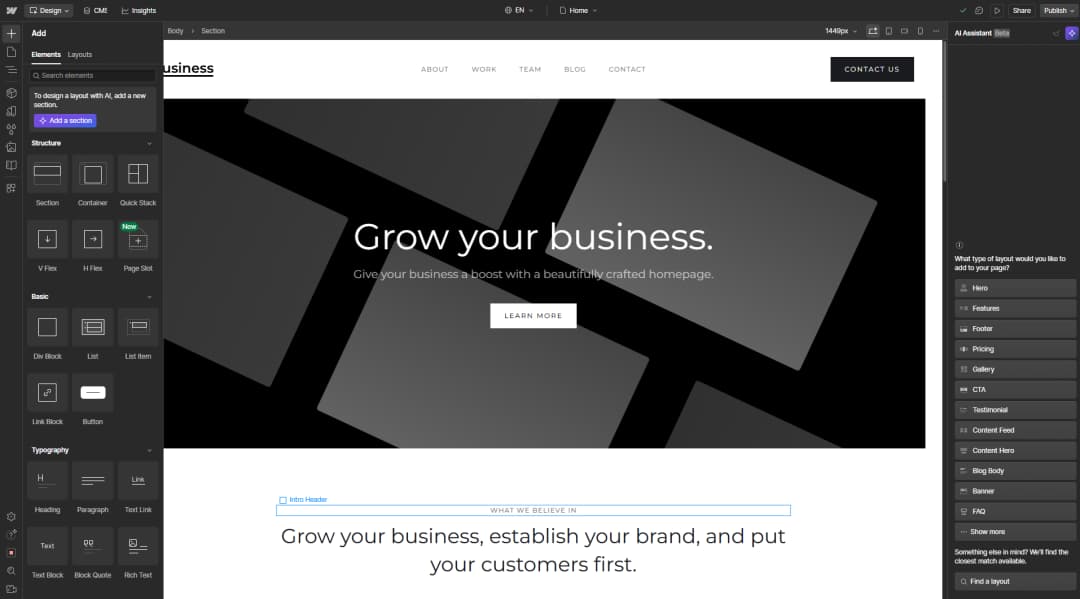
Webflow’s AI site builder can generate a site structure, initial content, and editable theme from a brief. That may include pages such as Home, About, Services, Blog, and Contact. Webflow continues to provide visual design, components, CMS, and publishing capabilities for teams that work beyond the first draft. [4]
The practical strength is not only the generated site. A growth-focused business may need repeatable page patterns, several editors, CMS collections, forms, and brand consistency across dozens of pages. The value of Webflow rises when someone owns that system, not when the launch brief is just “make a five-page website.”
Important 2026 restriction: Webflow’s September 11, 2026 help page says the AI site builder can create a brand-new site or edit an existing AI-generated site. It cannot be applied to an existing site that was not originally built with the AI site builder. The same source says the unpaid generation path is limited to two pages, while paid Workspace or Site plans can generate up to five pages initially, with additional pages afterward. These details make a big difference to redesign projects. [4]
What to check: A company with a mature non-AI Webflow site should not assume it can press a button and re-generate that existing production site. Check workspace permissions, CMS capacity, localization, ecommerce suitability, and current AI credit terms. Webflow’s 2026 plan changes were also phased by account, making screenshots of old price grids unreliable. [5]
A good pilot: Generate a services website from scratch, define three repeatable service pages, create CMS content, and give an editor a constrained update task. Evaluate how consistently the design survives changes.
Official sources: https://help.webflow.com/hc/en-us/articles/38840145286035-Build-a-site-with-Webflow-s-AI-site-builder and https://help.webflow.com/hc/en-us/articles/51059955082387-Updated-pricing-and-simplified-plans-for-May-2026
4. Squarespace Blueprint AI: Best for Guided Brand-First Sites
Best for: photographers, consultants, artists, boutique businesses, and solo founders who want a cohesive site without having to invent a design system.
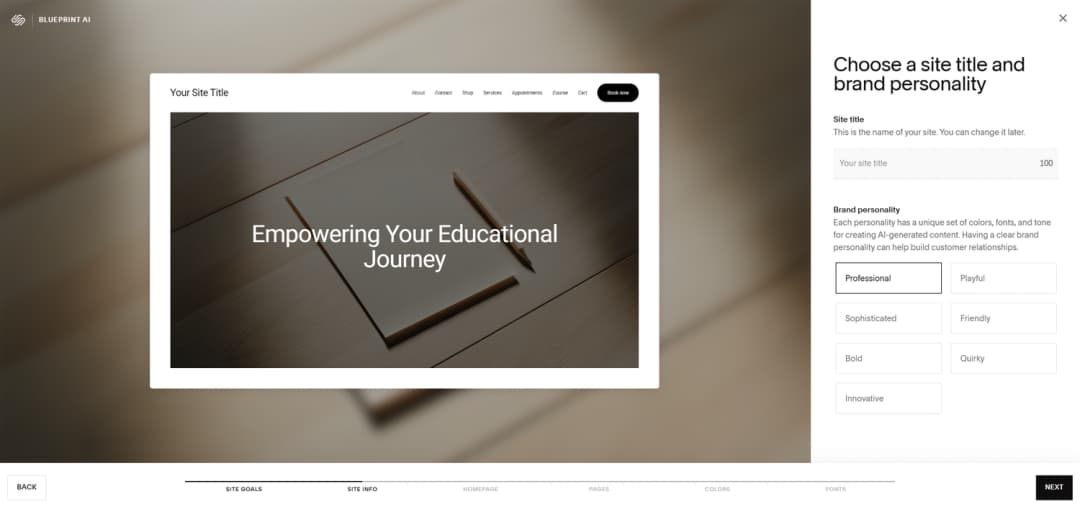
Squarespace Blueprint AI uses the context you provide to shape a website direction, including page structure, brand personality, typography, colors, and sections. Its current product page describes the process as a personalized starting point refined with the Squarespace editor. The help center distinguishes Blueprint AI Builder and AI templates, and explains that both are available on computers rather than mobile devices. [6][7]
The advantage is editorial restraint. Not every owner wants endless generative possibilities. A focused set of design decisions can help turn a vague brief into a publishable site with fewer opportunities to get lost in implementation details.
Where it fits: A portrait photographer could start with a brand-led gallery site and then manage portfolio pages, services, an inquiry page, and occasional announcements. The result is a website to maintain, not a one-off AI demonstration.
What to check: Squarespace’s own help center says AI-created text and images may use third-party AI systems, and the user is responsible for what goes live. Review copy, image rights, SEO titles, accessibility, and any claims about your business before publishing. Verify whether the commerce, scheduling, or membership functionality you need is included in the plan. [7]
A good pilot: Create a five-page portfolio business site. Replace every generated image and testimonial with authentic material; confirm the editor can add a new project and update gallery descriptions without redesigning the page.
Official sources: https://www.squarespace.com/websites/ai-website-builder and https://support.squarespace.com/hc/en-us/articles/206545337-Choosing-the-right-template
5. Hostinger AI Builder: Best for a Straightforward Hosted Start
Best for: a small company or entrepreneur who wants an approachable hosted website and the option to switch between visual editing and natural-language generation.
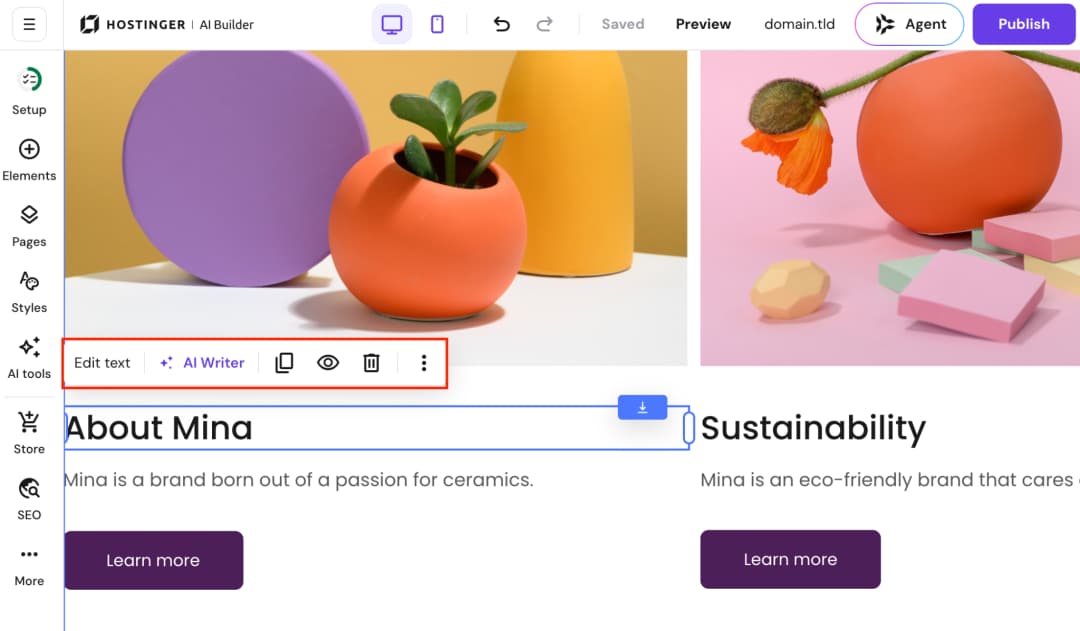
Hostinger’s current AI Builder documentation describes a product that combines its former website builder and Horizons into one builder with Manual and Agentic modes. Manual mode starts from AI generation and continues through drag-and-drop editing, while Agentic mode supports prompting toward websites and web-app-style experiences. This is more specific than older reviews describing only a basic template generator. [8]
That dual model can help a business owner who wants to move quickly but still reposition sections visually. Built-in content and image tools are useful for drafting, although finished business sites still need authentic copy and imagery.
Where Hostinger fits: A young services business needs five pages, a basic blog, contact forms, perhaps a starter store, and bundled hosting. It has neither a design team nor an internal developer. A simple managed workflow reduces early decisions.
What to check: Confirm the exact meaning of any “included” domain, hosting term, email service, payment function, export route, renewal price, and site limits. An attractive introductory rate does not answer the three-year ownership question. More complex web-app claims also deserve role, security, and data-portability checks.
A good pilot: Generate an agency-style site, edit the mobile navigation, connect a real form destination, and test a full publish-and-revise cycle. Record how many tasks required support or workarounds.
Official source: https://www.hostinger.com/ai-builder
6. 10Web: Best for a WordPress-Oriented AI Building Path
Best for: agencies and business owners specifically considering WordPress or a WordPress-adjacent content workflow, rather than a completely closed website service.
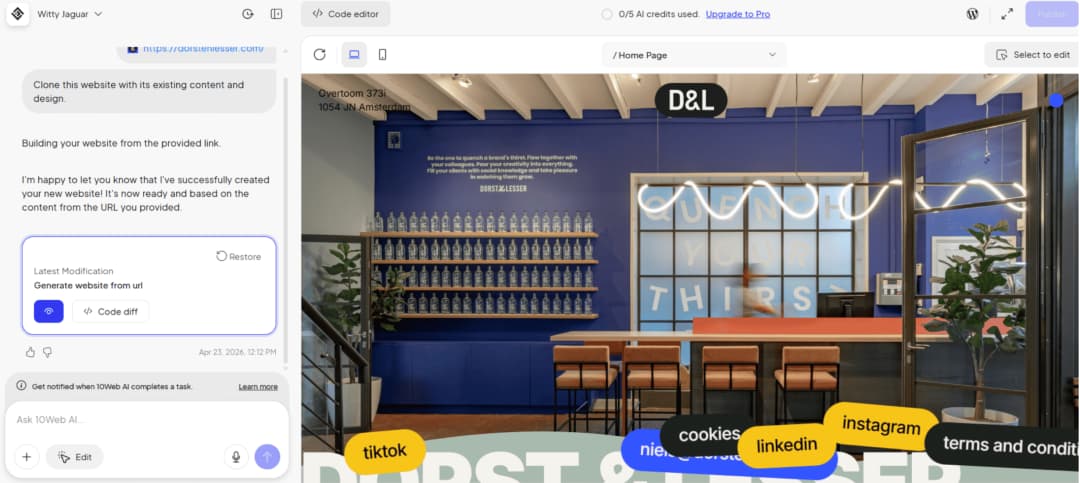
10Web’s current builder page promotes prompt-based generation, in-editor AI modifications, URL-based redesign, and a Figma-to-website route. It also positions its platform around WordPress sites and managed website services. [9]
For a WordPress business, this is a different architectural conversation from Wix or Squarespace. The important question is not “Did the AI produce five pages?” but “What parts of the resulting site remain editable and portable, and what hosting or editor dependencies remain?” A site with WordPress underneath can still depend heavily on a proprietary workflow or plugin stack.
Where 10Web fits: An agency wants to prototype a WordPress site quickly, then continue developing, managing, and handing it off with clear plugin and hosting responsibilities. The generated first draft may save repetitive page setup.
What to check: 10Web advertises design-to-WordPress and URL-to-site workflows, but do not assume every imported element is faithful or production-ready. Test accessibility, headings, page speed, responsive breakpoints, forms, plugin compatibility, and what happens if you migrate hosting. Treat vendor-stated 90+ speed claims as product marketing until independently verified on your own build.
A good pilot: Create a content-led company site, add two custom post types or reusable content layouts if needed, move a backup to another environment, and test whether ordinary WordPress editors can continue maintaining it.
Official source: https://10web.io/ai-website-builder/
7. Durable: Best for a Fast Service-Business Presence
Best for: independent tradespeople, consultants, and sole operators who need a simple site and practical business tools more than a bespoke design experience.
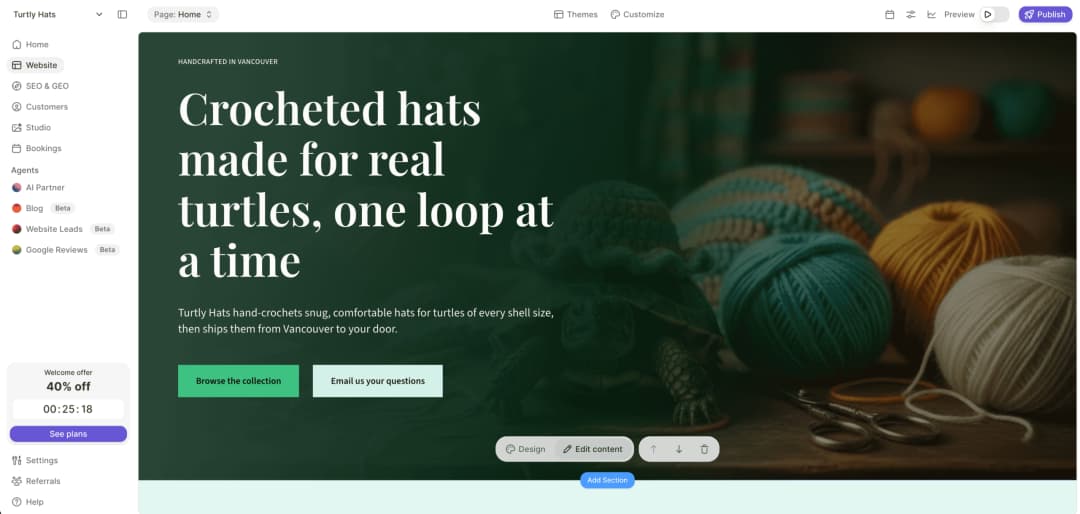
Durable positions its AI website builder around launching a business website quickly, with related tools oriented toward small-business operations. Its product messaging emphasizes simplicity rather than detailed canvas controls or an enterprise design system. [10]
This makes sense for a landscaper who would rather have an accurate services page, compelling local proof, an inquiry form, and a reliable phone number than spend days adjusting an animation. In that context, the winner is the tool that produces fewer operational chores.
Where Durable fits: A self-employed professional wants to establish credibility, share services and contact details, and make basic updates without a web team.
What to check: Evaluate customization depth, content-management options, SEO and URL controls, integrations, exportability, and whether operational tools are included or separately priced. A site that launches in a minute may still need several hours of real business content and quality assurance.
A good pilot: Build a three-service site, update service areas, connect lead capture, then test how a prospect reaches you from a phone and whether you can track the inquiry.
Official source: https://durable.com/ai-website-builder
Which AI Website Builder Should You Choose?
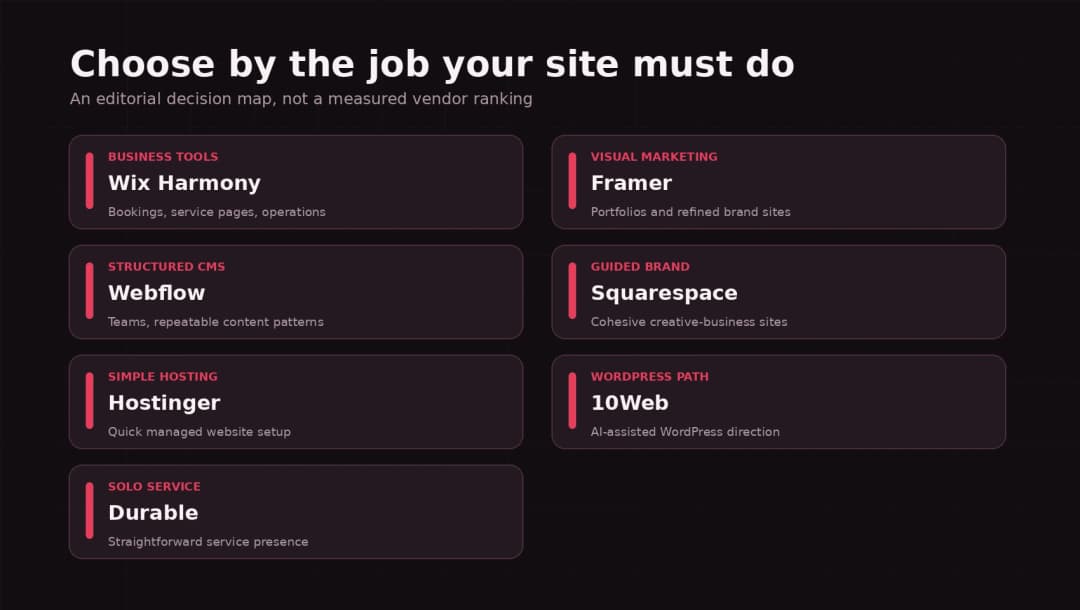
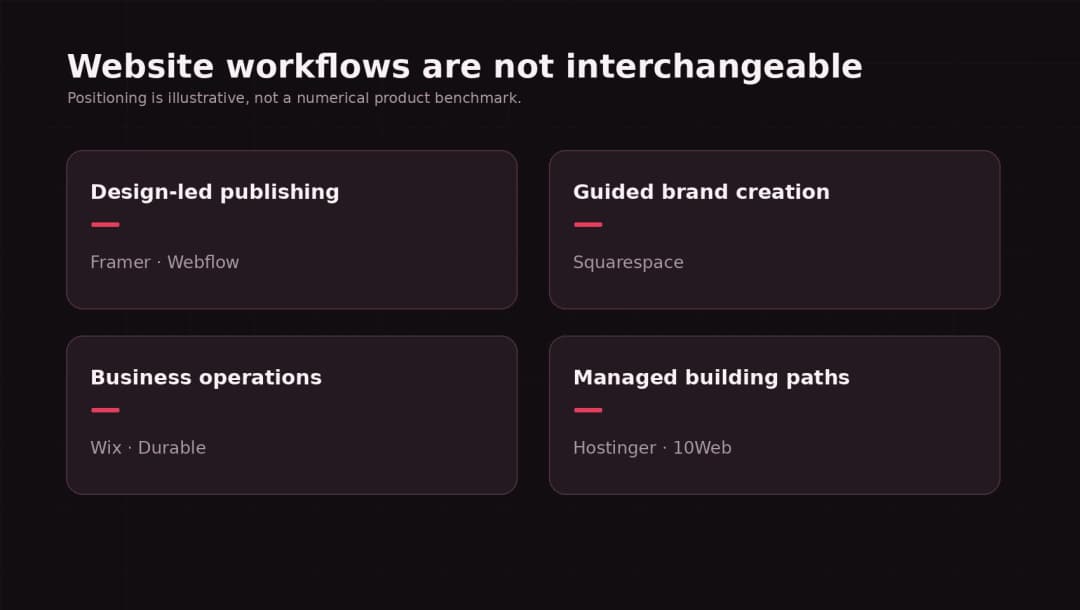
The right answer gets easier when you match the builder to the work your team will repeat. A design-led marketing operation benefits from a different workflow than a business that mainly needs customer bookings.
| If your main need is… | Shortlist first | Why | Validate before purchase |
|---|---|---|---|
| Booking and business tools | Wix Harmony | Site and routine operations in one platform | Booking, contact flows, plan limits |
| Portfolio or brand marketing | Framer | Editable visual design and publishing | CMS, responsive editing, ownership |
| Larger structured marketing site | Webflow | CMS, repeatable structures, visual control | New-site AI restriction, editor seats |
| Guided creative site | Squarespace Blueprint AI | Coherent brand decisions and site sections | Desktop setup, business feature plans |
| Simple hosted small-business site | Hostinger | Two AI/visual modes with hosted setup | Renewals, features, site migration |
| WordPress-directed workflow | 10Web | AI generation toward WordPress-based sites | Export, hosting dependency, editor details |
| Quick solo-service presence | Durable | Low-friction public website and business tools | Site controls, integration and data ownership |
Three sample buying decisions
A local dental practice: The decision is driven by accurate services, appointment handling, local SEO, and the staff’s ability to edit content. Wix may deserve the first pilot; WordPress with a proper booking stack could also be relevant if the organization wants tailored workflows. A beautiful generated hero is less valuable than reliable appointment handling and compliance review.
A design agency: The portfolio presentation, case-study publishing process, detailed responsive behavior, and client handoff are central. Framer or Webflow are natural shortlists. Test the quality of the second and third revisions, not just the first result.
An editorial publisher that wants WordPress: A WordPress route such as 10Web may deserve evaluation, alongside a conventional block-theme build. The critical factors are content migration, editorial workflow, hosting independence, and plugin maintenance.
What AI Website Builders Usually Leave for You to Do
Most product demos begin with the cheerful part: type one sentence and receive a website. The work left after generation deserves its own checklist.
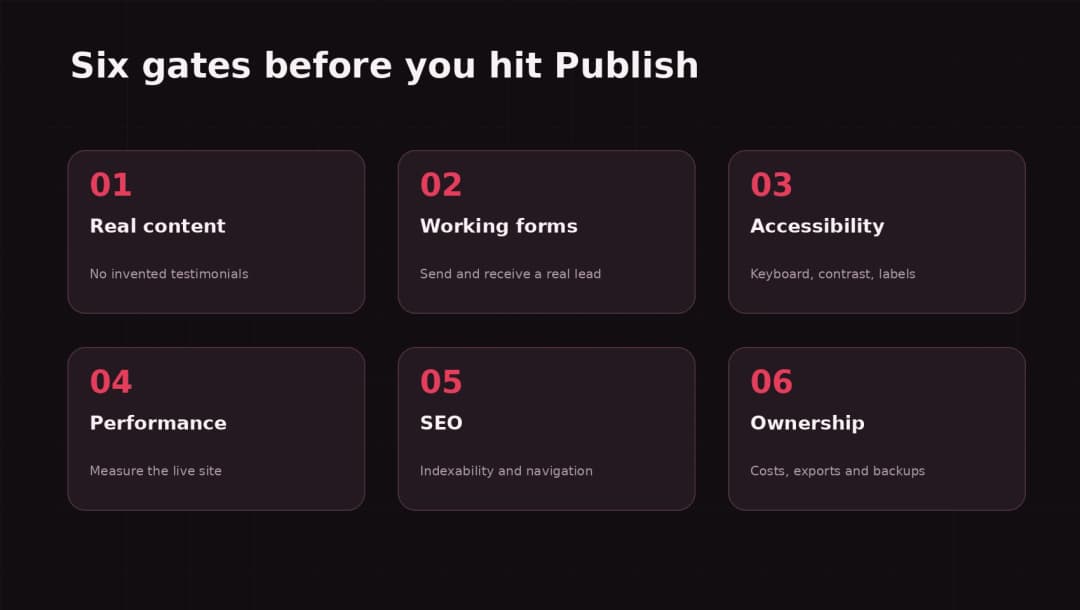
1. Replace generic content with actual expertise
AI-written headlines often promise similar things: trusted service, smart solutions, premium experience. None proves why a customer should buy from you. Interview the business owner, collect examples, document exact services, and write pages around customer decisions. Review every number, legal promise, guarantee, and testimonial before publishing.
2. Test forms and conversion paths end to end
A visually correct form may send to the wrong mailbox, omit consent language, or fail silently. Submit a lead using a real address, check the destination, verify confirmation messages, and test mobile keyboard behavior. If the business relies on bookings, test cancellation and error flows too.
3. Check accessibility with real interaction
Use headings in the right order, meaningful link labels, keyboard focus, visible error messages, sufficient contrast, and text alternatives for informative images. Automated checks can find some problems but do not replace keyboard and screen-reader review. The applicable benchmark depends on your organization and jurisdiction; WCAG 2.2 is a useful current accessibility standard.
4. Measure the published site’s performance
Look at the deployed page using field data where available and tools such as PageSpeed Insights and Chrome’s performance tooling. Do not quote a vendor’s homepage claim as your own Core Web Vitals result. Images, fonts, third-party scripts, embedded calendars, and consent widgets can dominate page behavior.
5. Verify SEO and migration requirements
A generated site still needs crawlable pages, sensible URLs, unique titles, navigable links, indexable content, and internal linking. Google’s Search Essentials do not promise indexing merely because a page meets technical requirements. If you are replacing an existing website, plan URL redirects and preserve valuable content before launch. [11]
6. Understand how you leave
Ask four questions: Can you export the content? Can you export design/code? Can you move hosting? What happens to forms, payments, CRM data, and domain settings? A website purchase is partly a decision about future migration work.
How to Compare AI Website Builders Without Inventing a Benchmark
You do not need a laboratory to run a useful pilot, but you do need consistent inputs. Give each shortlisted tool this brief:
Create a five-page website for a fictional home-renovation company named Northstar Renovations. Pages: Home, Services, Projects, About, Contact. Use a charcoal and warm-red palette, a three-step inquiry journey, two service categories, an editable project listing, mobile navigation, visible form validation, and no fabricated customer testimonials. Replace all proof with clearly marked placeholders.
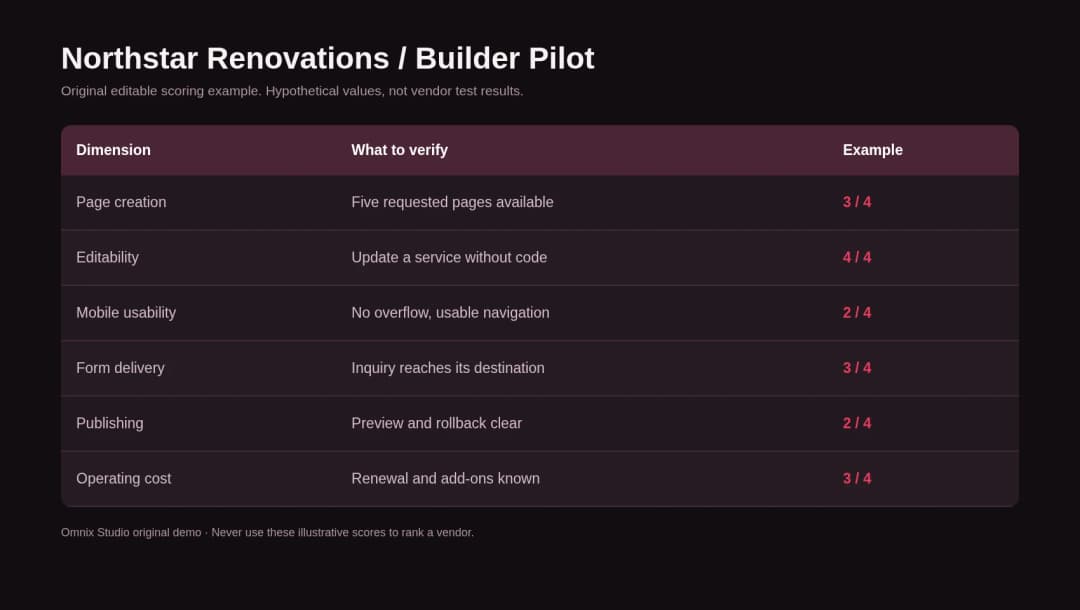
Then measure six observable outcomes: completeness of requested pages; how easy it is to fix incorrect copy; desktop/mobile behavior; publishing and rollback; content editor independence; and total monthly/annual running costs. Capture your own screenshots and notes. Repeat a second iteration, such as adding a sixth project case study, because editing is where workflow differences emerge.
A rating is meaningful only if it is based on those actual results. This article provides the evaluation protocol and a downloadable scorecard, not fictional first-hand measurements.
A simple scoring rubric
Rate each area from 0 to 4: 0 = cannot complete, 1 = difficult or broken, 2 = possible with major workaround, 3 = works with some manual cleanup, 4 = straightforward and repeatable. Record evidence and the plan used. Avoid calculating a single “winner” if one business-critical requirement fails completely: a tool that cannot meet legal or data needs is not rescued by attractive typography.
AI Website Builder Pricing: Compare the Total Cost, Not the Introductory Deal
Product subscriptions change frequently. Promotions, annual terms, region, renewals, and editor or AI allowances can make price tables go stale faster than the article itself. Before committing, calculate an entire year of operation:
Year-one cost = base plan + domain + required integrations + transaction fees + AI/usage overages + developer setup + content production + maintenance.
Also estimate year two and year three with renewal pricing, not the promotional landing-page headline. Request a written explanation of what you can export if you leave. For a small static portfolio, the editor experience might outweigh a few dollars. For a growing business with memberships, payments, and booking records, ownership and integration work usually matter more.
A comparison with made-up per-month pricing gives false precision. The provided worksheet contains editable line items rather than assumed vendor prices.
A Practical Website Launch Checklist
Before publishing, confirm the site has a clear offer, useful navigation, real business facts, tested inquiry path, mobile usability, keyboard support, descriptive metadata, working internal links, and a plan for updates. A site builder can assist with all of these but should not be assumed to have verified them.
For readers still choosing between a template, a custom build, and a more advanced stack, it may also be useful to distinguish an ordinary website from a product interface. Our AI frontend tools comparison covers code-first creation, while our AI design tools guide focuses on design-stage output. This article is specifically about operating a published site.
When an AI Website Builder Is Not Enough
Choose a conventional agency-led or custom build when you need a deeply differentiated brand system, difficult integrations, custom permission models, complex accessibility obligations, multi-market content governance, or long-term architecture that cannot be explained by standard site-builder features. You can still use AI for wireframes, first-draft copy, QA support, and repetitive engineering tasks. The tool does not have to own the final platform to be valuable.
Omnix Studio CTA: If the site your business needs has moved beyond a generated template, explore Omnix Studio’s design and development services. A useful first conversation is about goals, existing systems, content ownership, and who will maintain the site after launch—not about choosing a builder from a promotional feature list.
Frequently Asked Questions
What is the best AI website builder for a small business?
Wix Harmony is a strong place to start when you need a traditional business website with accompanying operations. Squarespace and Hostinger are also useful candidates if ease of setup or visual direction is the main priority. Run a trial with your actual requirements before paying.
Which AI website builder is best for designers?
Framer is an attractive choice for visual website work, while Webflow fits teams that need more formalized content and design structures. The better choice depends on who will edit the site after the designer hands it off.
Can AI create an SEO-friendly website?
It can help with drafts, titles, layouts, and internal links, but rankings are not guaranteed. Evaluate crawlability, content usefulness, technical signals, and performance on the final published version. Google’s Search Essentials explains the minimum technical requirements. [11]
Can I use an AI builder for WordPress?
10Web promotes WordPress-related site generation. Elementor also offers AI-assisted site planning and editing in the WordPress ecosystem, although it is a different workflow from an all-in-one hosted AI site generator. [9][12] Confirm plugin, theme, hosting, and export dependencies before building a commercial site.
Are AI website builders really free?
Some offer a free creation step or limited trial. Publishing on a custom domain, removing branding, expanding pages, using ecommerce, or increasing AI usage can require a paid plan. Check the exact plan rather than treating “free to generate” as “free to operate.”
Will AI-generated websites all look the same?
They can if you keep the default copy, assets, and layout. Authentic product images, a distinct content structure, strong visual hierarchy, useful customer stories, and careful design iteration make the biggest difference. AI is a starting mechanism, not an identity.
Is a website builder better than a developer?
For routine sites and small teams, often the lower-maintenance option is a builder. A developer becomes valuable when the site needs custom integrations, behavior, data handling, accessibility rigor, or architectural control that the chosen platform cannot provide cleanly.
Final Verdict
The best AI website builder in 2026 is the one your team can correct, publish, and maintain after the novelty of generation wears off. Choose Wix for a business-suite orientation, Framer for design-led publishing, Webflow for structured marketing operations, Squarespace for guided brand presentation, Hostinger for a simple hosted route, 10Web for a WordPress-minded build, and Durable for a lean service presence.
Whatever you choose, evaluate a real publishing workflow. A website is not finished when the AI stops typing. It is finished when customers can find what they need, take action, and trust what happens next.
Sources and Research Notes
[1] Wix AI website builder and Aria: https://www.wix.com/ai-website-builder
[2] Wix Harmony editor: https://support.wix.com/en/article/wix-harmony-editor-creating-a-site-with-ai
[3] Framer AI website builder: https://www.framer.com/ai/
[4] Webflow AI site builder limitations (updated September 11, 2026): https://help.webflow.com/hc/en-us/articles/38840145286035-Build-a-site-with-Webflow-s-AI-site-builder
[5] Webflow 2026 phased plan changes: https://help.webflow.com/hc/en-us/articles/51059955082387-Updated-pricing-and-simplified-plans-for-May-2026
[6] Squarespace AI website builder: https://www.squarespace.com/websites/ai-website-builder
[7] Squarespace Blueprint AI selection and desktop restriction: https://support.squarespace.com/hc/en-us/articles/206545337-Choosing-the-right-template
[8] Hostinger AI Builder Manual and Agentic modes: https://www.hostinger.com/ai-builder
[9] 10Web AI site builder: https://10web.io/ai-website-builder/
[10] Durable AI website builder: https://durable.com/ai-website-builder
[11] Google Search Essentials and indexing requirements: https://developers.google.com/search/docs/essentials
[12] Elementor AI Site Planner: https://elementor.com/help/build-an-entire-website-from-scratch-with-elementor-ai/
Disclosure: This comparison uses official source documentation and editorial judgment. No account-level vendor trials or standardized performance tests were conducted. Screenshots sourced from vendors require permission and capture-date notes. All original diagrams are editorial illustrations, not actual product screenshots.