Lovable made a compelling promise: describe an app in ordinary language and get something people can actually use. But the moment you add real customers, private data, integrations, and a second developer, the question changes. You are no longer choosing the tool that produces the prettiest first screen. You are choosing how your product will be built, maintained, and eventually handed over.
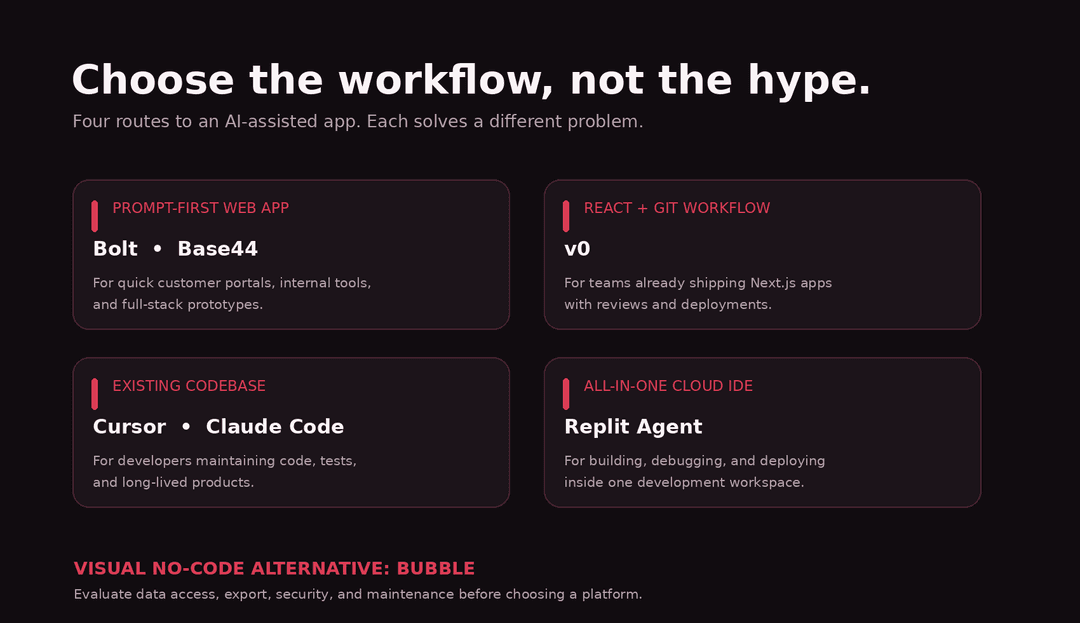
The best Lovable alternative depends on what you want to control. Bolt is a close browser-based alternative. Replit offers a broader coding and deployment workspace. v0 is especially attractive for React and Vercel teams. Base44 prioritizes built-in application services. Cursor and Claude Code put the repository in the center. Bubble takes a very different, visual no-code route.
Key Takeaways
• Bolt is a close match when you want prompt-driven, full-stack building in a browser, with cloud database, auth, and hosting options.
• Replit is a strong choice when building, debugging, collaboration, and deployment should happen in one software-development workspace.
• v0 fits teams that care about React/Next.js interfaces, GitHub branches, and shipping through Vercel.
• Base44 is appealing for internal apps and business workflows that benefit from managed backend services and connectors.
• Cursor and Claude Code are better thought of as coding agents than no-code app builders; they reward teams that want to own and maintain a repository.
• Bubble provides visual control over UI, workflows, and data, but its applications run on Bubble’s platform rather than as exportable source-code projects.
• Before picking any tool, test repository access, permissions, failure handling, usage costs, and the exit plan.
What Counts as a Real Lovable Alternative?
Not every product that accepts a prompt is competing for the same job. An AI UI generator can make a beautiful dashboard but leave you to build authentication, APIs, and storage. A coding agent can modify a complicated production repository but is not necessarily approachable for a nontechnical founder. A no-code platform may give you mature visual workflows in exchange for platform dependence.
For this guide, we include seven options that can replace at least one substantial part of Lovable’s workflow. We compare their intended use, development experience, backend route, source-code portability, deployment, and practical tradeoffs. This is a documentation-led editorial comparison, not a claim that we ran identical benchmark projects inside every paid product.
The Shortlist at a Glance
| Tool | Best for | Strength | Check before buying |
|---|---|---|---|
| Bolt | Browser-based full-stack prototypes | Prompt + editor + backend services | Permission boundaries, usage |
| Replit Agent | All-in-one software creation | Agent + cloud IDE + deploy | Maintainer experience, cost |
| v0 | React and Vercel teams | Git-backed edits, previews, hosting | Stack fit and review |
| Base44 | Internal/business workflows | Managed data, auth, connectors | Service limits and portability |
| Cursor | Existing codebases | Repo-aware edits, debug, tests | Developer oversight |
| Claude Code | Terminal-first developers | Repository tools and tests | Requires engineering skill |
| Bubble | Visual no-code apps | UI, data, workflows | Platform dependence |
Why People Look Beyond Lovable
Lovable’s official documentation supports GitHub two-way sync and external development workflows, so it would be wrong to say that Lovable simply traps your code. Its current pricing also shares usage credits across a workspace, rather than charging by collaborator seat. Both are meaningful strengths. [1][2]
An alternative becomes interesting when something specific is missing: you want to import an existing repository instead of creating a new one, work with established tests, inspect data migrations, manage a complex visual business workflow, or deploy inside your current infrastructure. Define that missing capability before migrating.
1. Bolt: Best for Browser-Based Full-Stack Prototyping
Best for: founders, marketers, and lean teams who want to generate a usable web app and keep iterating in the browser.
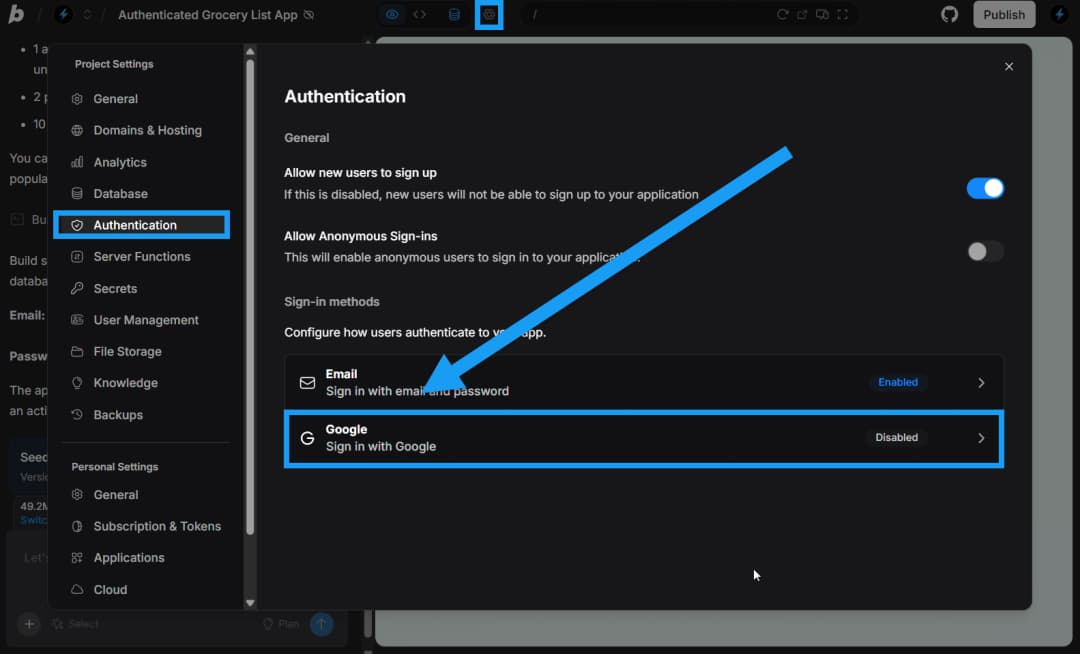
Bolt is one of the closest alternatives to Lovable because it connects prompt-driven building with an in-browser development experience. Its official site now emphasizes Bolt Cloud for hosting, databases, user authentication, and integrations. Its documentation also covers GitHub workflows and importing design context from tools such as Figma. [3][4]
The appeal is immediacy. You can describe a customer portal, review the result, identify a missing state, and ask the agent to fix it without first assembling a local development environment. For fast proof-of-concept work, reducing that setup can be valuable.
Where Bolt wins: a small team wants to explore an app, connect a database, and publish a trial without spreading work across too many services.
Where it gets harder: complex permission rules, payment edge cases, and long-running applications still demand inspection. The fact that an agent can create a login screen does not prove that each tenant sees only its own records.
Practical test: build two user roles, a protected record, and an error state. Then inspect what happens when one user attempts to access the other’s data.
Official website: https://bolt.new/
2. Replit Agent: Best for Building and Shipping in One Workspace
Best for: founders who want a more complete coding workspace, or technical teams working toward a maintained web product.
Replit Agent works inside a cloud development platform rather than a standalone page generator. Replit documents agent-driven creation and a task-board workflow that separates planned, active, ready-for-review, and completed work. This matters because applications rarely arrive as a single prompt. A real project needs several rounds of requirements, code changes, testing, and release decisions. [5]
Replit’s advantage is continuity between the agent’s output and the broader development environment. Developers can inspect files, debug behavior, and work toward deployment without treating every generated screen as a separate export.
Where Replit wins: an app needs repeated engineering work, not just a campaign demo. It can be useful for a startup with a developer who will continue maintaining what the agent starts.
Tradeoff: the wider workspace can feel heavier than a minimal chat-first builder. It also does not remove the need to design data models, secure secrets, and test the deployment.
Practical test: ask the agent to add an audit log, then locate the implementation, write a failing test, and confirm the fix survives a new deployment.
Official website: https://replit.com/
3. v0: Best for React, Next.js, and Vercel Workflows
Best for: web development teams that want AI-assisted UI creation and a clear path into version-controlled code.
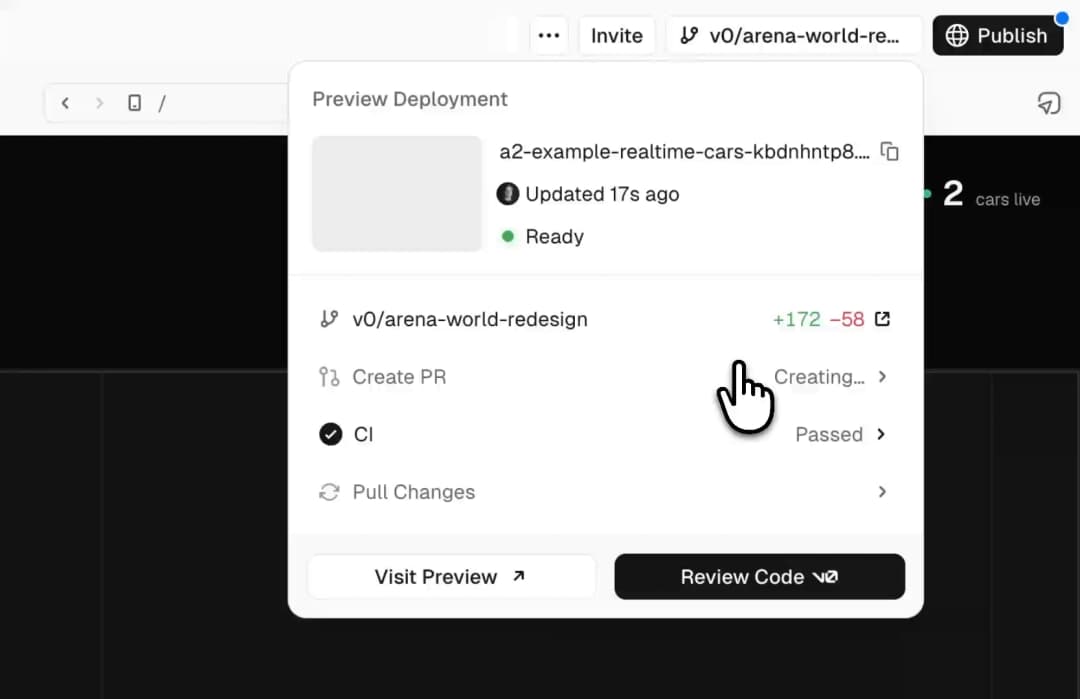
v0 is no longer accurately described as a mere component generator. Its 2026 documentation describes an integrated code editor, repository import, project organization, server-side previews, API routes, database integrations, and deployment to Vercel. GitHub integration can create branches and commits and support pull requests, which makes it easier to review AI-generated changes before merging them. [6][7][8]
That workflow fits a team that already thinks in terms of features, pull requests, preview deployments, and production releases. A marketing page, account dashboard, or customer self-service interface can move into a familiar engineering review process.
Where v0 wins: you have a React/Next.js product, use Vercel, and care about component quality and repository history.
Tradeoff: being close to the modern JavaScript stack is also a constraint. If you want to build a complex mobile application or a platform-neutral business process without touching code, another product may feel more natural.
Practical test: import a small existing repository, generate one feature, review the diff, check keyboard accessibility, and merge through a pull request.
Official website: https://v0.app/
4. Base44: Best for Internal Tools and Backend-Heavy Business Apps
Best for: operations portals, approval apps, internal dashboards, and workflows that need data, authentication, and integrations.
Base44 presents itself as a prompt-to-product builder with screens, backend logic, data, authentication, permissions, and publishing built in. Its developer offering also includes a CLI, SDK, functions, and an API-based backend. The public documentation identifies connections to services such as Slack, Google Calendar, Salesforce, and Google Drive. [9][10][11]
The practical benefit is fewer decisions before a workflow becomes usable. An agency building a small approval tool does not necessarily want to choose a database host, build auth from scratch, and wire the first integration manually.
Where Base44 wins: an app is mostly forms, permissions, stored records, and process automation.
Tradeoff: confirm exactly how code export, backend ownership, integrations, and usage billing work for your plan. A managed backend reduces setup work but does not remove operational dependencies.
Practical test: build a three-stage approval workflow with separate requester and approver roles, then test rejected approvals and malformed data.
Official website: https://base44.com/ai-app-builder
5. Cursor: Best When You Already Have a Codebase
Best for: developers taking a prototype into an existing product or maintaining a repository over time.
Cursor is an AI-assisted coding environment rather than a simple prompt-to-app publishing service. Its documentation describes agents that explore codebases, change multiple files, execute terminal commands, and help test and debug changes. For ongoing software development, that repository awareness is more important than getting an impressive landing page from a first prompt. [12]
Where Cursor wins: you need to refactor a feature, repair a build, integrate with an existing design system, or have AI work within established tests and rules.
Tradeoff: nontechnical users will usually need a developer to set up the project, review the diff, and approve changes. Cursor can help write code; it does not automatically validate your security model or deployment strategy.
Practical test: point Cursor at a failing test and an existing design component; ask it for the smallest fix rather than a rewrite.
Official website: https://cursor.com/
6. Claude Code: Best for Terminal-First Engineering Teams
Best for: teams comfortable with repositories, command-line workflows, and code review.
Claude Code works in a developer’s coding workflow. Official guidance covers repository exploration, implementation, testing, debugging, and automation tasks. Unlike Lovable’s visual, prompt-first app canvas, Claude Code is suited to working inside the files and commands that already define a product. [13]
Where Claude Code wins: the problem is no longer ‘can AI create a prototype?’ but ‘can an agent safely modify a real application while preserving its architecture?’
Tradeoff: it requires engineering oversight, explicit acceptance criteria, a testing strategy, and access controls. For a solo founder who wants to drag a button on a canvas, this is usually too low-level.
Practical test: specify an acceptance test, request a plan, have the agent implement one narrow feature, and inspect the test output before merging.
Official website: https://code.claude.com/
7. Bubble: Best for Visual No-Code Workflows
Best for: founders and operations teams who want to build and control application logic visually.
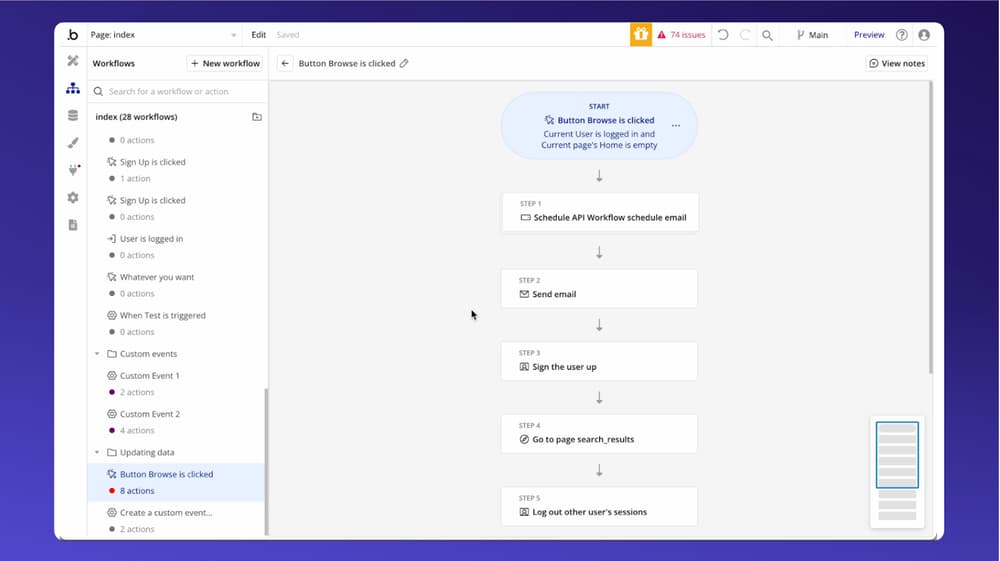
Bubble combines AI-assisted starting points with a visual editor for interfaces, databases, and workflows. Its platform supports web applications and a native mobile-app-building route. Unlike code-first tools, Bubble allows users to refine much of the product without reading generated JavaScript. [14]
This is a genuine alternative to Lovable, but the tradeoff is structural. Bubble’s own documentation states that users can export application data, while the application itself runs on Bubble and cannot simply be exported as source code to host elsewhere. [15]
Where Bubble wins: a no-code team needs detailed visual workflows and plans to operate within Bubble’s ecosystem.
Tradeoff: leaving the platform means rebuilding application logic. Budget for long-term hosting and workload characteristics, not just the first month of building.
Practical test: create a moderately complex conditional workflow, set privacy rules, and map what would need rebuilding if you changed platforms.
Official website: https://bubble.io/
How to Choose: Five Questions That Matter After Launch
1. Who will maintain the code in six months? A nontechnical team and an engineering team have different requirements. Buy for the future maintainer, not just the first builder.
2. Where will your data live? Confirm how backups, exports, ownership, and deletion work. A polished sign-up page is not evidence of a safe database.
3. How do roles and permissions work? Test access in the backend, not only whether a menu item disappears from the interface.
4. Can you review changes? For customer-facing software, version history, staging, pull requests, and rollback are meaningful safeguards.
5. How does usage cost grow? Generation prompts, hosted traffic, storage, database operations, AI calls, and team access can be charged differently. Model one month of development and one month of operation.
A Mini Evaluation You Can Run in an Afternoon
Give every shortlisted platform the same brief: ‘Build a customer portal with admin and customer roles. Customers can submit support requests, upload one attachment, and see only their own requests. Admins can update a status and leave an internal note. Include an empty state, a failed upload message, and a keyboard-operable form.’
Score the result on six criteria: clarity of the interface; correct role-based authorization; behavior on mobile; validation and error states; how easily you can inspect or export the implementation; and whether a second person can maintain it. Write down what worked, what required intervention, and the estimated ongoing cost. No synthetic benchmark score is offered here because we did not perform that controlled test.
What About Pricing?
Prices and credit packages change frequently, and headline monthly fees do not capture all running costs. Lovable’s current documentation says credits can apply to building, cloud usage, and AI features, with a shared workspace balance. Other platforms may meter tokens, agent usage, application hosting, or workload. [2]
Instead of a fragile price-by-price ranking, calculate: (monthly subscription + generated-work allowance + app hosting + database/storage + third-party API charges + maintenance time) for your actual use case. Verify the live pricing pages before publishing or purchasing. This guide intentionally does not promise that any alternative is the cheapest.
When Should You Keep Lovable?
A competitor is not automatically an upgrade. Stay with Lovable when your team is productive, the application fits its web-oriented workflow, the repository sync meets your ownership needs, and your costs remain predictable. Switching tools to solve an isolated design problem can introduce migration, test, and deployment work that outweighs any gain.
If the product has already reached real customers, do not rebuild simply because a new model produces a more attractive first screen. Audit the current product, measure the actual bottleneck, and move only if the alternative fixes it.
Where Omnix Studio Fits
AI builders are useful accelerators, but getting a demo to behave like dependable software is a separate job. If your team needs product UX, a reusable design system, WordPress or custom web development, or help turning a prototype into a maintainable application, explore Omnix Studio’s design and development services: https://omnixstudio.co/services
For more context, see our related guides: Best AI Frontend Tools (https://omnixstudio.co/blog/best-ai-frontend-tools), AI Prototyping Tools (https://omnixstudio.co/blog/ai-prototyping-tools), and Google Stitch Alternatives (https://omnixstudio.co/blog/google-stitch-alternatives). New October articles should only be linked after their URLs are published and verified.
Frequently Asked Questions
What is the closest alternative to Lovable?
Bolt is one of the closest in interaction style because it offers browser-based prompt-to-app building with backend services. Base44 is another close option for business-process apps. The right answer depends on the workflow and desired level of developer control.
Is there a free Lovable alternative?
Several vendors offer free entry plans or trials, but allowances, publishing restrictions, and credit models change. Check the live plan for each product and evaluate whether the free level supports the feature you need.
Which Lovable alternative is best for professional developers?
Cursor and Claude Code are strong choices when the real job is maintaining source code. v0 can also be attractive for teams centered on React, GitHub, and Vercel.
Can I move my Lovable app into GitHub?
Yes. Lovable documents a two-way GitHub sync for project code. Be aware of the documented limitations and review the backend and service dependencies separately. [1]
Can Bubble applications be self-hosted outside Bubble?
Not as a simple source-code export. Bubble explicitly documents that its applications run on Bubble and that moving to another platform requires rebuilding the application logic. [15]
Can an AI app builder replace a development agency?
It can reduce the time needed to validate an idea or produce working software. A production application still needs UX decisions, accessibility checks, security reviews, backup and deployment planning, and accountable maintenance. The dividing line depends on the cost of failure, not on whether AI can generate a first version.
Sources and Verification
Lovable GitHub two-way sync and limitations: https://docs.lovable.dev/integrations/github
Lovable pricing and credit rules: https://lovable.dev/pricing
Bolt official site and Bolt Cloud scope: https://bolt.new/
Bolt GitHub integration: https://support.bolt.new/integrations/git
Replit Agent overview and task board: https://docs.replit.com/features/agent/overview and https://docs.replit.com/references/agent/task-board
v0 2026 product changes: https://v0.app/docs/faqs
v0 GitHub workflow: https://v0.app/docs/github
v0 deployment: https://v0.app/docs/deployments
Base44 app builder: https://base44.com/ai-app-builder
Base44 developer platform: https://base44.com/developers
Base44 connectors: https://base44.com/integrations
Cursor Agent documentation: https://cursor.com/docs/agent/overview
Claude Code use cases: https://support.claude.com/en/articles/14553517-claude-code-common-developer-use-cases
Bubble product: https://bubble.io/
Bubble data ownership and source-code portability: https://manual.bubble.io/account-and-marketplace/application-and-data-ownership