
Omnix Studio editorial guide | Research reviewed October 13, 2026 | This is a prevention and recovery framework, not a guarantee of unchanged rankings.
A website redesign should make your business easier to understand and your site easier to use. Yet it is surprisingly easy to launch a cleaner website and discover that the pages bringing in search visitors have disappeared, changed addresses, or stopped being indexable.
The problem usually isn’t the new typography or navigation. It’s the invisible decisions made during the rebuild: deleted content, altered URLs, missing redirects, changed canonical tags, internal links that still point to the old site, and staging settings accidentally copied to production.
You can lower those risks considerably. You cannot guarantee zero traffic fluctuation. Google says site moves can temporarily affect search visibility while its systems discover and process changes. The goal is to protect important pages and make every change traceable, testable, and reversible where practical. [1]
This guide walks through a redesign in three phases: before launch, on launch day, and after launch. It includes a worked example, a redirect map, launch checks, a monitoring plan, and editable worksheets your team can use.
Key takeaways
- Keep existing URLs when you can. If a page continues to serve the same purpose, changing its path only adds migration work and risk.
- Benchmark before touching the site. Export Google Search Console landing-page, query, and indexability data, along with analytics conversions and a complete URL inventory.
- If URLs change, map each old address to the most relevant new page. Use server-side permanent redirects (usually 301 or 308); avoid dumping unrelated old pages onto the homepage. [1][2]
- Preserve search intent and useful content. A visual redesign should not silently remove the FAQs, product details, headings, or service descriptions that made the page valuable.
- Audit production robots, canonicals, sitemaps, internal links, structured data, and tracking before launch. One stray sitewide
noindexcan undo careful design work. [3][4] - Monitor page groups, not just the site’s total traffic. Investigate top landing pages and key queries across comparable periods, accounting for seasonality. [5]
- Treat the work as a migration project. Give every critical URL, redirect, metric, and owner a place in the handoff.
First, decide what kind of redesign you’re doing
“Website redesign” can mean at least four different things, and the SEO checklist changes with the scope.
| Project | What changes | Main SEO risk | Best first move |
|---|---|---|---|
| Visual refresh | Colors, components, typography, layout | Hidden or shortened content; inaccessible navigation | Preserve URLs and key content; compare rendered pages |
| Information architecture update | Menus, page hierarchy, content consolidation | Broken internal links and changed relevance | Inventory pages, queries, and user journeys |
| CMS or frontend migration | WordPress to another stack, theme rebuild, headless frontend | Rendering, metadata, canonicals, sitemap behavior | Crawl old and staged versions; compare templates |
| Domain or URL migration | Domain, hostname, protocol, or URL paths | Lost URL signals and redirect errors | Create complete old-to-new mapping and test redirects |
A refresh with the same URL structure is typically simpler than a complete move. Google’s URL-changing site-move guide is specifically for changes such as new domains and paths; moving hosting without changing visible URLs follows a different process. [1][6]
This distinction matters when someone asks, “Will we lose SEO if we move from WordPress to Next.js?” Neither platform inherently requires a loss. The risk comes from how the new site handles URLs, content, server responses, navigation, and operations. For related context on content and domain consolidation, Omnix Studio has also published website design considerations for mergers and acquisitions.
Quick rule: the more you change simultaneously, the harder it becomes to identify what caused a traffic drop. Where possible, separate redesign, URL migration, domain changes, and major content pruning into distinct releases.
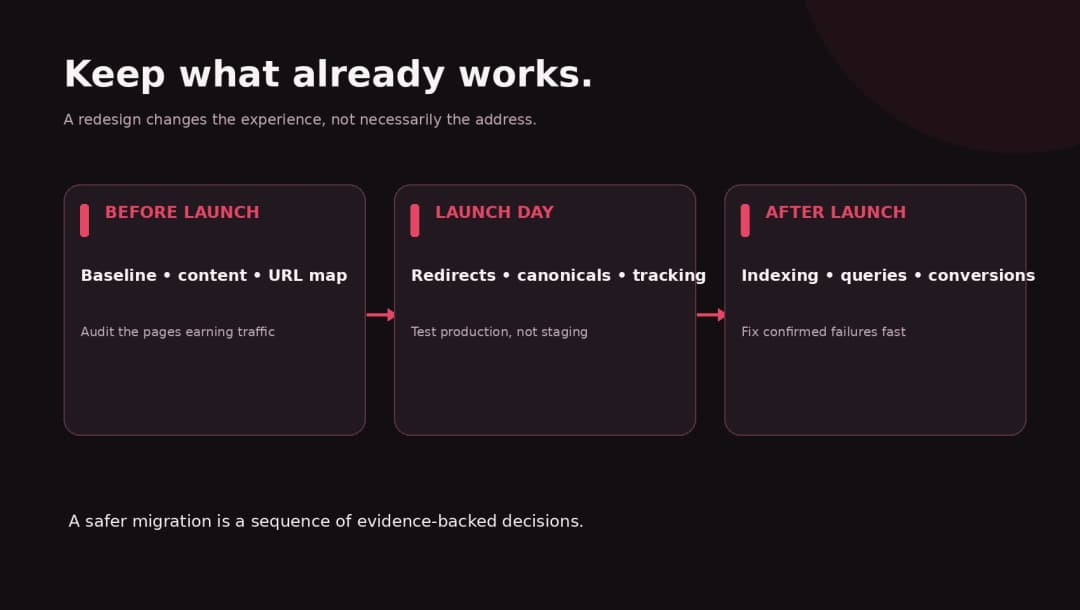
Phase 1: Before launch, protect what already works
1. Export a baseline from Google Search Console and analytics
You need an answer to “What did we have before?” that doesn’t rely on memory.
In Google Search Console, record organic clicks, impressions, average position, and CTR for the important landing pages. Review the queries associated with each page. Pull a wider history for seasonal businesses, and record device and country segments if they are commercially meaningful. Google recommends comparing equivalent periods and looking for patterns by page and query when diagnosing traffic changes. [5]
In your analytics platform, record organic landing-page sessions, engaged sessions, leads, purchases, form submissions, or whichever outcomes matter to the business. Save the tracking implementation so event names and attribution remain comparable after the migration.
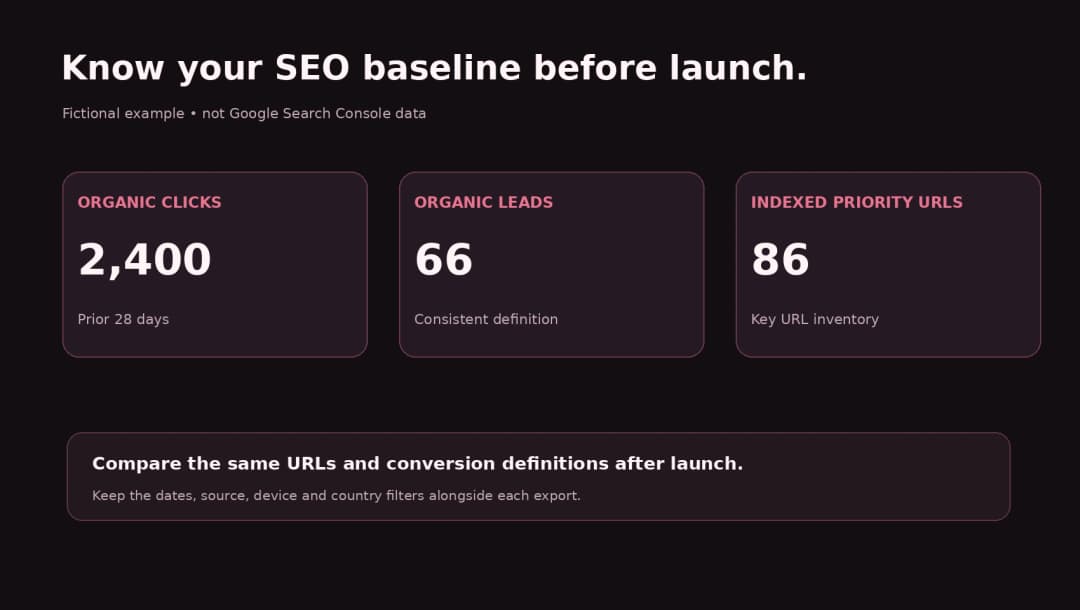
Baseline template:
| Metric | Before redesign | After redesign | Interpretation |
|---|---|---|---|
Organic clicks to /services/ |
2,400 | 2,310 | Example: -3.8%; investigate only with context |
Organic leads from /services/ |
66 | 71 | Example: conversions improved despite fewer clicks |
| Indexed important URLs | 86 | 85 | Example: inspect the missing URL |
| 404s on previously valuable URLs | 0 | 2 | Example: fix or restore relevant destinations |
All figures above are invented solely to demonstrate the worksheet. They are not an Omnix Studio client result.
Do not judge launch success from an organic-traffic percentage alone. A site’s other channels may grow or shrink; organic sessions, Google Search clicks, and qualified conversions each answer a different question.
2. Crawl and inventory the current site
Build a URL list from at least four places: the live website crawl, XML sitemaps, Search Console pages, and analytics landing pages. Add high-value backlink destinations and campaign URLs when you can access them.
For every meaningful URL, preserve:
- Current URL and preferred canonical URL
- HTTP status and indexability
- Page type, title, meta description, H1, key H2s, and major content sections
- Organic clicks, impressions, and conversions (with clearly labeled date range)
- Internal links pointing to it and important backlinks
- Media or downloadable assets and relevant structured data
- Proposed action: keep, update, merge, redirect, retire, or investigate
A sitemap is a useful source, not a complete inventory. Google explains that sitemaps declare preferred URLs and assist discovery, but inclusion does not guarantee indexing. [7]
For small sites, a spreadsheet is enough. For larger sites, use a crawler, analytics exports, Search Console data, and scripts that can compare thousands of addresses. Never treat “not in the latest sitemap” as proof a page has no value.
3. Protect the pages and content earning search visibility
A redesign is often when someone decides to shorten every page so the new grid looks neat. This can remove answers that users were specifically searching for.
Sort pages into three groups: (1) strong search performers, (2) strategically important pages that may not receive many clicks, and (3) genuinely obsolete pages. Preserve search intent on the first two groups. If the old page covered pricing, use cases, integrations, FAQs, or location-specific details, decide deliberately whether those elements remain relevant.
Do not preserve low-quality content forever just because it has a URL. Instead, record the reason for removing or consolidating each page and where a person seeking that information should now go. A redirect is appropriate when there is a close replacement. If the subject is truly gone and no substitute is relevant, a real 404 or 410 may be more honest than an irrelevant homepage redirect. Google’s move guidance warns that many unrelated redirects to one destination can be interpreted as soft 404s. [1]
Content parity checklist: Do users still find the same core answer? Is the page’s topic equally clear? Are important product specifications, service locations, and next-step links still discoverable? Does the mobile layout show the same critical information?
4. Design the new information architecture before changing URLs
Create a simple map of primary navigation, service pages, products, resources, blog categories, and conversion paths. Match the map to actual user tasks, not only to how your team is organized internally.
Before deleting a category or combining service pages, look at which pages currently receive queries and links. Consolidation can work when multiple pages truly cover the same topic and the replacement covers that information well. It does not work simply because a navigation menu looks cleaner with fewer entries.
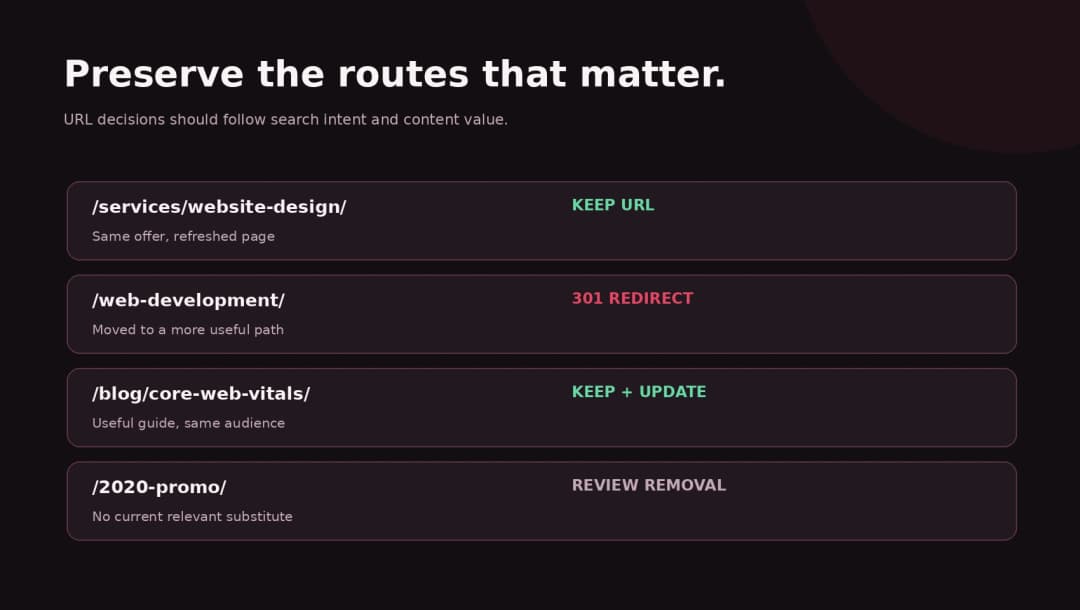
Keep slugs stable unless the change has a clear user or structural benefit. /services/website-design/ does not become better for SEO just because someone renames it /our-solutions/web-experiences/.
5. Build the redirect map before development is finished
The most useful migration document is often a boring spreadsheet: every old URL, its new destination, the reason for the move, and a test result.
| Old URL | New destination | Action | Why |
|---|---|---|---|
/web-design/ |
/services/web-design/ |
301 | Same service, new hierarchy |
/blog/website-redesign-checklist/ |
Same URL | Keep 200 | Content updated, address unchanged |
/old-seo-package/ |
/services/seo/ |
301 only if comparable | Confirm new page answers same intent |
/events/2018-meetup/ |
No replacement | Review 404/410 | Historical page retired; check backlinks first |
These are illustrative example paths, not real Omnix Studio migration instructions.
Google considers 301 and 308 permanent server-side redirects strong signals of a move. Temporary 302/307 codes have a different purpose, so don’t use them casually when the change is permanent. [2]
A good redirect map is one hop whenever practical. Avoid /old/ → /intermediate/ → /new/, circular loops, redirecting all pages to the homepage, and pointing to destinations that return errors or noindex.
Store the map in version control or in a shared project folder. Ask the developer to implement it at the web server or edge layer when possible, and ask QA to test response status and final destination independently of browser visuals.
6. Keep staging private without poisoning the production site
A staging website is where teams rehearse the migration. Protect it with authentication when possible; it is more reliable for keeping private content private than hoping an unlinked page stays undiscovered. Google documents password protection as an option for preventing access to confidential content. [8]
Teams also use noindex on staging pages. That’s valid if the crawler can access those pages and see the directive; Google says a robots.txt disallow can prevent it from seeing noindex. [3]
The launch danger: copying the staging noindex into the live website, or accidentally keeping a sitewide indexing block turned on. Verify the actual production HTML response and HTTP headers after DNS, caching, and deployment have settled. Never assume a WordPress dashboard checkbox tells the whole story.
7. Compare the new site with the old one before launch
Run side-by-side tests on representative pages and all high-traffic URL templates: homepage, service, product, category, blog, location, search, and checkout if relevant.
Check visible content, headings, metadata, canonical targets, indexability, internal links, image alt text, structured data, and server response codes. If the frontend is JavaScript-heavy, verify important content and links appear in rendered output and are accessible to crawlers. Keep accessible HTML navigation and sensible fallback behavior.
Do not let visual QA replace technical QA. A beautiful page can be a 200 status with a noindex directive, and a good-looking redirect can send users through several hops before reaching the intended content.
8. Define owners and rollback conditions
A redesign needs a launch decision-maker and clear owners for redirects, tracking, SEO metadata, content, development, and analytics. Make sure the team knows who can stop a launch if a blocker appears.
Agree on critical failures that trigger immediate rollback or emergency repair: sitewide noindex, broken top revenue pages, many high-value URLs returning 404, invalid domain redirects, inaccessible checkout, or missing analytics events. A traffic fluctuation alone is not usually a rollback criterion; first verify the measurement and the affected URLs.
Phase 2: Launch day is a technical release, not just a design reveal
9. Publish the new site and verify indexing controls
Before announcing anything, request a sample of important production pages with the real hostname. Confirm they respond with the expected status, are crawlable, carry intended robots directives, and declare coherent canonical URLs.
Google treats redirects and rel="canonical" as strong canonicalization signals, while sitemap inclusion is weaker. Conflicting signals make the crawler’s job harder. [4]
Verify that:
- Canonical URLs use the production hostname and intended final path.
- Production pages don’t accidentally refer to staging canonicals or staging assets.
noindexhas been removed from pages intended for search.- Canonical pages appear in the new XML sitemap, using absolute addresses.
- Hreflang, if you use it, points to valid localized canonical counterparts.
- Important redirects resolve and don’t lead to chained errors.
- SSL/TLS, DNS, hosting and CDN settings are functioning.
Do not add the Search Console Change of Address procedure for a simple redesign on the same domain. Google’s tool is intended for eligible site/domain moves, not for changing a page design or individual paths. [9]
10. Run the redirect tests against the deployed environment
Use the actual URL mapping CSV as the test plan. For every changed important URL, record its first response, final destination, number of hops, destination indexability, and whether its content matches the old intent.
A command-line check such as curl -I https://example.com/old-page/ can show a response header, but may need adjustment if the site handles HEAD requests differently from GET. For production QA, test a representative browser journey and use a tool that follows actual GET redirects as well. Do not paste an untested redirect rule into a live site and hope it works.
Ask a second reviewer to inspect the most valuable pages. It is easy for a developer who wrote the mapping to overlook a plausible-looking but incorrect destination.
11. Update internal links, navigation, and XML sitemaps
Redirects are for preserving old routes, not a substitute for fixing links you control. Update navigation items, footer links, in-text links, breadcrumbs, product cards, canonical tags, hreflang URLs, schema URLs, and XML sitemaps to the new canonical destinations. Google specifically advises updating internal and prominent external links after a move, and submitting new sitemaps. [1]
Where feasible, contact sites linking to moved high-value assets and ask for the direct URL to be updated. A permanent redirect can remain, but a direct link reduces extra network requests for visitors.
12. Verify tracking and conversions
Test the full business path: entry page → call to action → form or checkout → thank-you state and conversion event. Check tags in the consent state your site actually uses.
A ranking report doesn’t reveal that a redesigned contact form now fails silently. A funnel can look worse because events were renamed or tracking stopped firing, even when traffic is unchanged. Maintain a consistent before/after conversion definition so decision-makers don’t mistake instrumentation changes for customer behavior.
13. Test mobile usability, accessibility, and performance
Desktop approval screenshots are not enough. Review navigation and content on real or representative mobile widths. Test keyboard operation, contrast, readable labels, form errors, and responsive images.
Measure Core Web Vitals using both lab diagnostics and available field data: Largest Contentful Paint (LCP), Interaction to Next Paint (INP), and Cumulative Layout Shift (CLS). A page redesign can make a previously fast page heavier through background videos, large hero media, animation, or scripts. Performance numbers should come from actual tests, not aesthetic impressions.
For early-stage structure planning, see Omnix Studio’s guide to wireframing tools for UX designers. It can help teams validate navigation and page hierarchy before implementation.
Phase 3: After launch, monitor by page and by failure type
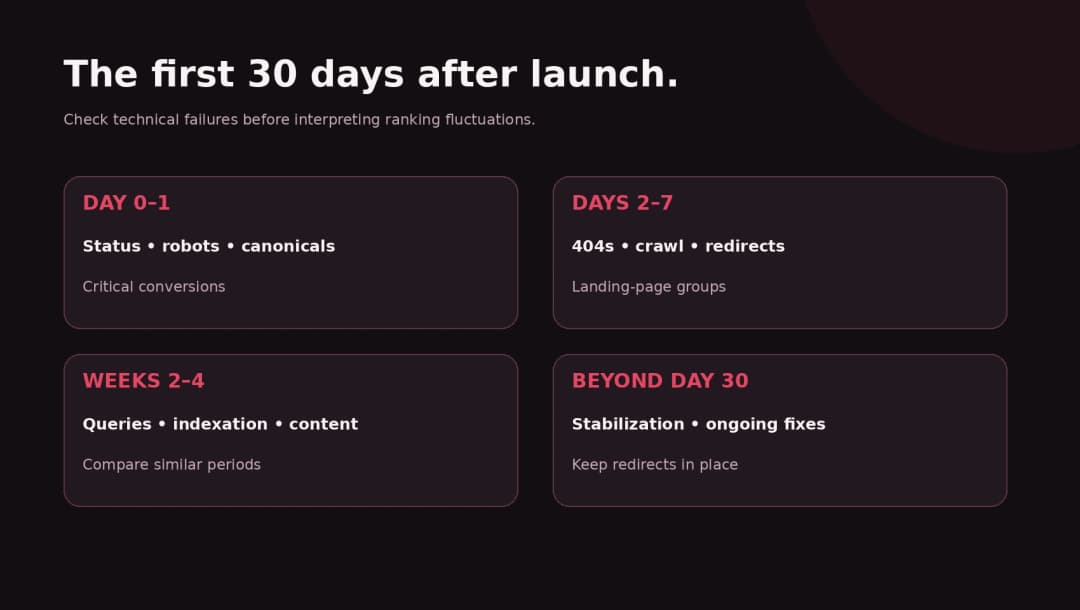
14. Watch a launch dashboard for at least the first month
Use a 30-day dashboard as a working schedule, not as a promise that Google will finish reprocessing your migration in 30 days. Google’s guidance says small and medium URL migrations may take weeks and large migrations longer. [1]
Day 0–1: Confirm top URL responses, robots controls, canonical targets, sitemap, analytics, and primary conversion paths. Fix critical errors immediately.
Days 2–7: Review Search Console indexing and performance, server 404s, redirect anomalies, and any strange changes to key landing-page groups. Continue confirming all important new URLs are crawlable.
Weeks 2–4: Compare relevant pre- and post-launch windows, drill down into lost queries and page groups, verify redirects still work, inspect Search Console-selected canonicals for suspect pages, and refine content where it no longer answers the user’s question.
After 30 days: Keep monitoring until major URL moves and performance settle. Schedule a retrospective that distinguishes recoverable errors, expected transition effects, seasonality, and true changes in demand.
15. Diagnose traffic drops without jumping to conclusions
An overall drop does not tell you what broke. Start with a table of affected URLs. Google recommends looking for patterns in pages and queries, comparing similar periods, and checking indexing problems when the impact is broad. [5]
| Symptom | First check | Possible explanation | Correct next action |
|---|---|---|---|
| All pages drop suddenly | Sitewide robots, server uptime, tracking | noindex, outage, measurement failure |
Inspect production HTML/headers and logs |
| Only moved pages drop | Redirect map and destination content | 404s, loops, irrelevant mapping | Correct redirects and internal links |
| Impressions stable, clicks lower | Titles, snippets, intent and CTR | Changed SERP appearance or relevance | Review affected query/page combinations |
| Blog traffic down but service traffic stable | Lost blog pages and category links | Content pruning or IA changes | Restore useful content or map properly |
| Organic sessions differ from Search Console clicks | Consent, analytics tags, channels | Tracking definitions or sampling | Compare consistent reports and events |
| Rankings vary for a few weeks | Migration processing and competitor demand | Temporary reprocessing or real change | Continue monitoring; fix confirmed defects |
One critical nuance: ranking shifts are not always technical migration failures. Search demand, algorithm updates, competitor changes, and seasonality can affect performance at the same time. Don’t sell a zero-fluctuation guarantee.
16. Keep redirects and keep learning
Google recommends retaining redirects for as long as possible, generally at least one year after a URL move, and notes that indefinite redirects can be useful for users. Update links you control to go directly to the new destination. [1]
Don’t dismantle the redirect infrastructure a week after the new design launches. Assign a long-term owner and document where rules live. Record exceptions discovered after launch so they don’t quietly become permanent support tickets.
Worked example: redesigning a 120-page B2B website
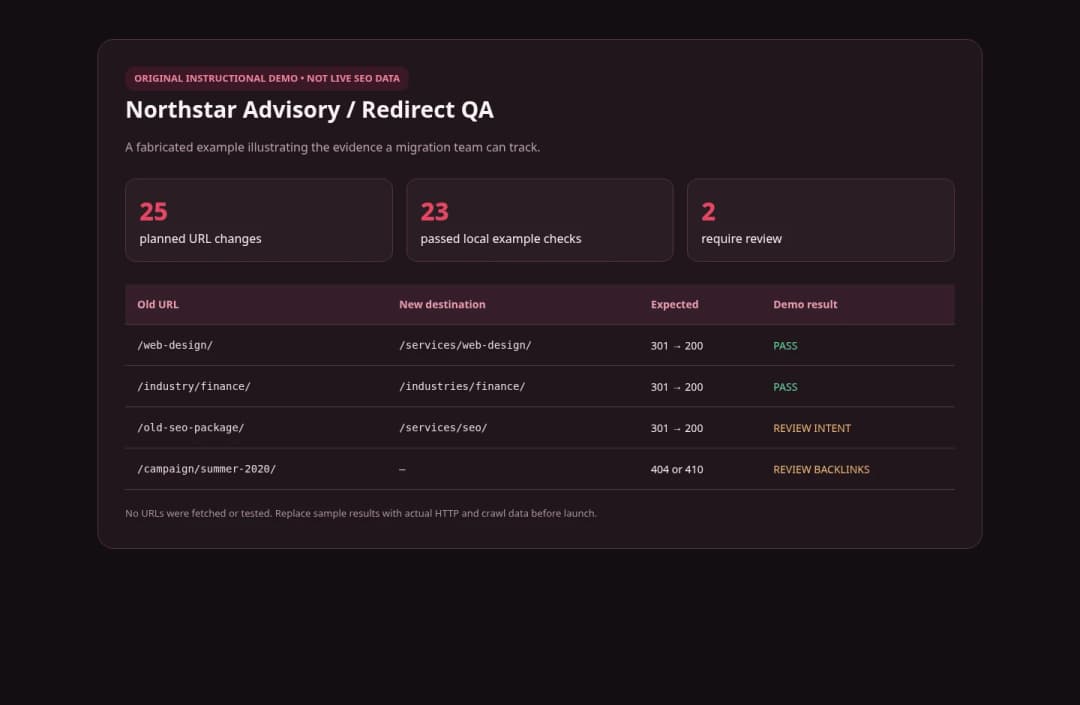
Imagine a fictional consulting company, Northstar Advisory, with 120 discoverable URLs. It wants a cleaner design, a modern editor, and a shorter menu. In the migration audit, the team finds:
- 12 service and industry pages account for 65% of the site’s organic leads.
- 28 educational articles bring top-of-funnel traffic and meaningful assisted inquiries.
- 14 old campaign pages are barely visited, but two have external backlinks.
- 25 URLs are proposed for new slugs because the information architecture is changing.
- The new template accidentally removes service-specific FAQs and places a
noindexrule on a production page.
These numbers are fictional and represent an instructional scenario, not client analytics or a study.
A sensible plan keeps the valuable service pages’ content and URLs wherever possible. It preserves and updates educational articles, maps the 25 planned URL changes individually, checks backlink destinations before retiring campaign pages, and fixes the noindex issue before launch. It also validates the contact form and compares the same organic-lead definition before and after the release.
The team reports an SEO migration scorecard rather than promising a new ranking number: percentage of critical pages returning 200, mapped moved URLs redirecting correctly, intended URLs indexable, zero high-value broken internal links, and verified conversions.
This example illustrates a process, not a guaranteed result. A technically clean move is the foundation for protecting search visibility; it cannot eliminate changes in algorithms, competition, demand, or the site’s content.
A practical prelaunch and postlaunch checklist
The downloadable publishing package contains a detailed CSV checklist. Use the abbreviated version below as a meeting agenda for launch approval.
| Stage | Must-pass checks | Evidence to save |
|---|---|---|
| Baseline | Search Console and conversion exports; priority URL list | Date-stamped exports and comparison periods |
| Content | Valuable pages, headings, FAQs and intent preserved | Old/new content matrix |
| Redirects | Every changed critical URL mapped, tested, relevant | Redirect-map CSV and status report |
| Technical SEO | Robots, canonicals, sitemap, schema, hreflang (if used) | Crawl results and sampled HTML |
| UX/performance | Mobile paths, forms, contrast, CWV checks | Browser screenshots and test results |
| Launch | Rollback owner, DNS and cache plan, link check | Release checklist and sign-off |
| Monitoring | Page/query dashboards and triage owner | 7/30-day report and issue tracker |
The tables are supplied as accessible, responsive HTML in the WordPress package. The sample redirection and QA tool provides a reproducible local demonstration, not access to an actual Search Console property.
Should you redesign and migrate the CMS at the same time?
Only when the advantages justify the extra test surface. For a content-led business website, a modern WordPress implementation can often preserve familiar editorial workflows without adding a new frontend framework. For custom interactive products, a different architecture may be appropriate. But moving to headless WordPress, Next.js, or another system creates additional responsibility for rendering, metadata, route behavior, previews, caching, and deployment.
Ask for a real architectural decision memo: What improves? What gets harder? Which editors and developers own the website after launch? How will canonical URLs and internal links be generated? Who monitors server failures and security updates? How will your team restore a page if the new version has a regression?
No platform is a ranking shortcut. A well-built and well-managed site can succeed on more than one stack; the implementation and content strategy are what matter.
How Omnix Studio can help
A redesign needs both design judgment and migration discipline. Omnix Studio works on UI/UX, WordPress, and custom web development, and can help define the experience, preserve critical content and URLs, plan redirects, build and test the new website, and hand over a maintainable system.
If you’re preparing a redesign, review your current pages and write down the nonnegotiables before anyone starts replacing templates. You can explore Omnix Studio’s design and development services and start with a technical and UX review rather than a visual mood board alone.
Frequently asked questions
Can a website redesign hurt SEO?
Yes. Rankings and traffic can decline if important content is deleted, URLs are changed without correct redirects, pages become non-indexable, canonical signals conflict, or the new site performs poorly. Even a well-managed move may cause temporary fluctuations while search engines process the changes. [1]
Should I change URLs during a redesign?
Not unless there is a compelling reason. If a page still serves the same topic and audience, retaining its address avoids needless redirect work. If a URL must change, implement a tested relevant permanent redirect and update internal links. [1][2]
Are 301 redirects enough to preserve rankings?
No single technical setting guarantees rankings. Permanent redirects are an important canonicalization signal, but the destination must be relevant, accessible, and backed by consistent internal links and content. Google processes moves over time. [1][2][4]
How long should I keep redirects?
Google recommends generally at least one year after a move, and longer where possible for users. [1]
Do I need Google Search Console’s Change of Address tool?
Only for eligible domain or hostname moves, not for a redesign on the same domain or merely changing paths. Follow Google’s instructions for the specific move type. [9]
Can staging noindex affect my new production website?
Yes, if the rule is copied into production and remains visible to crawlers. Inspect actual production meta robots tags and response headers; don’t depend solely on settings in the admin interface. [3]
Can I switch from WordPress to another platform without losing traffic?
You can reduce migration risk, but nobody can promise no change. Preserve the content and routes that matter, plan relevant redirects for changes, confirm indexability and canonical signals, test conversions, and monitor page-level search performance. [1][5]
When should I decide a traffic dip is a problem?
Immediately investigate confirmed technical failures, particularly widespread noindex, server errors, and valuable pages with broken redirects. Interpret search-performance changes across comparable periods and with an understanding of normal processing time, seasonal demand, and unrelated ranking factors. [5]
Sources and editorial notes
[1] Google Search Central, site moves with URL changes: Official documentation
[2] Google Search Central, redirects and Google Search: Official documentation
[3] Google Search Central, block indexing with noindex: Official documentation
[4] Google Search Central, canonicalization and duplicate URLs: Official documentation
[5] Google Search Central, debugging Search traffic drops: Official documentation
[6] Google Search Central, changing hosting without changing URLs: Official documentation
[7] Google Search Central, build and submit a sitemap: Official documentation
[8] Google Search Central, control content shared on Search: Official documentation
[9] Google Search Central, getting started with Search Console: Official documentation
All source claims were checked in October 2026. Fictional examples are labeled. This is not a tested migration or a guarantee of rankings. Before publication, verify vendor documentation, existing internal links, screenshots, and the real site’s CMS and Search Console settings.